

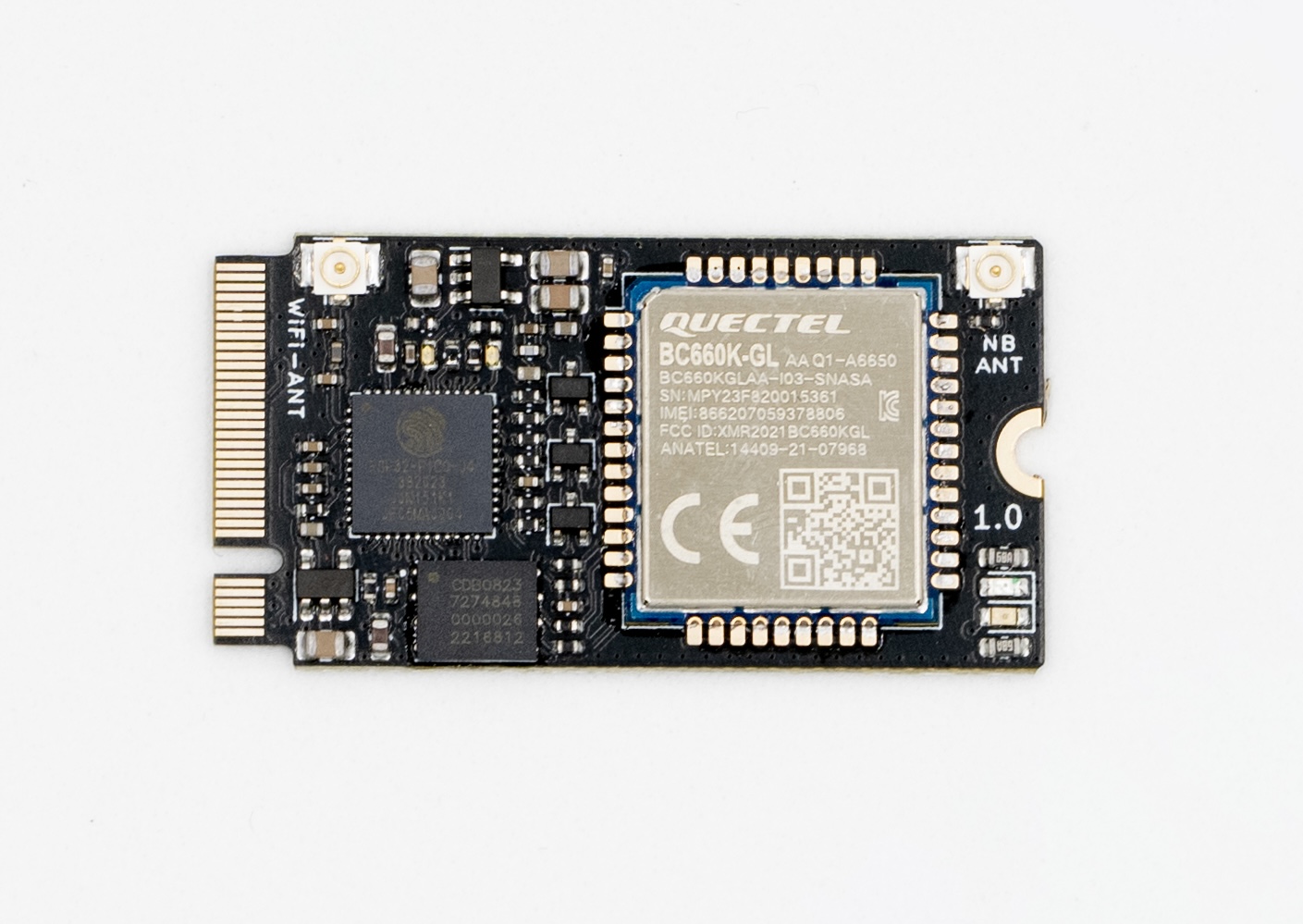
The M2 IoT Modem is a 22 × 42 mm module in M.2 2242 format that adds Wi-Fi, Bluetooth and NB-IoT to your own hardware. An ESP32-PICO-D4 runs your firmware and drives a Quectel BC660K-GL NB-IoT modem with a soldered 1NCE eSIM, so the whole module is programmed from one processor with the Arduino framework, ESP-IDF or MicroPython. It suits products that must connect where there is no Wi-Fi: city and environmental monitoring, industrial equipment, asset tracking, farming or home automation.
Not for standard M.2 slots
The module uses the M.2 2242 mechanical format only. Its pinout is not compatible with the M.2 slots of laptops or SSD adapters: plugging it into one can damage the module and the host. Use it only with carrier boards designed for it.
Specifications
| Feature | Specification |
|---|---|
| Form factor | M.2 2242 (22 × 42 mm), 4-layer PCB |
| Processor | ESP32-PICO-D4, dual-core Xtensa LX6 up to 240 MHz |
| Memory | 4 MB SPI flash, 520 KB SRAM, 448 KB ROM, 16 KB RTC SRAM |
| Wi-Fi | 802.11 b/g/n, 2.4 GHz |
| Bluetooth | v4.2 BR/EDR and BLE |
| NB-IoT modem | Quectel BC660K-GL (LTE Cat NB2), controlled with AT commands |
| NB-IoT bands | B1/2/3/4/5/8/12/13/17/18/19/20/25/28/66/70/85 |
| SIM | 1NCE eSIM (MFF2), soldered on board |
| Antenna connectors | 2 × U.FL: WiFi-ANT (Wi-Fi and Bluetooth) and NB ANT (NB-IoT) |
| GPIO | 10 ESP32 GPIOs at the connector, plus UART0 and GPIO0 |
| Programming | Arduino framework, ESP-IDF or MicroPython, through UART0 of the ESP32 |
| Peripherals | UART, SPI, I2C, I2S, LED PWM, pulse counter, GPIO, capacitive touch, ADC, DAC, TWAI |
Power
| Pin | Voltage | Use |
|---|---|---|
| VBUS (pins 1 and 2) | 5 V | Power input. |
| +3.3V (pins 38, 49 and 54) | 3.3 V | Output from the ESP32 supply rail, for references or low-power external circuits. |
The modem supply is generated inside the module and is not available at the connector.
LEDs
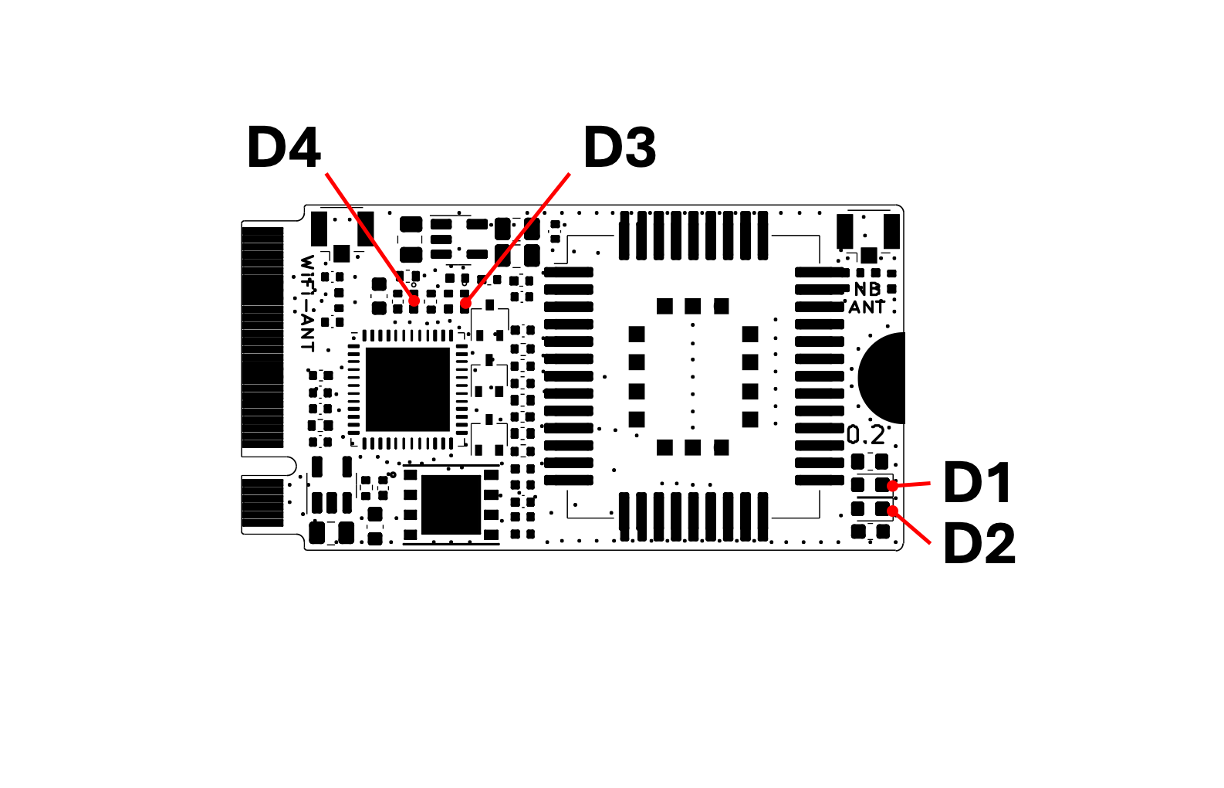
| LED | Color | Shows |
|---|---|---|
| LED1, modem power | Red | On while the BC660K-GL is powered. |
| LED2, network status | Yellow | NB-IoT network status, driven by the modem. The blinking pattern depends on the modem LED mode (AT+QLEDMODE). |
| LED3, TX | Blue | Blinks when the ESP32 sends data through UART0 (programming or serial console). |
| LED4, user | Red | Free for your firmware, on GPIO21. Set GPIO21 HIGH to turn it on. |
Pinout
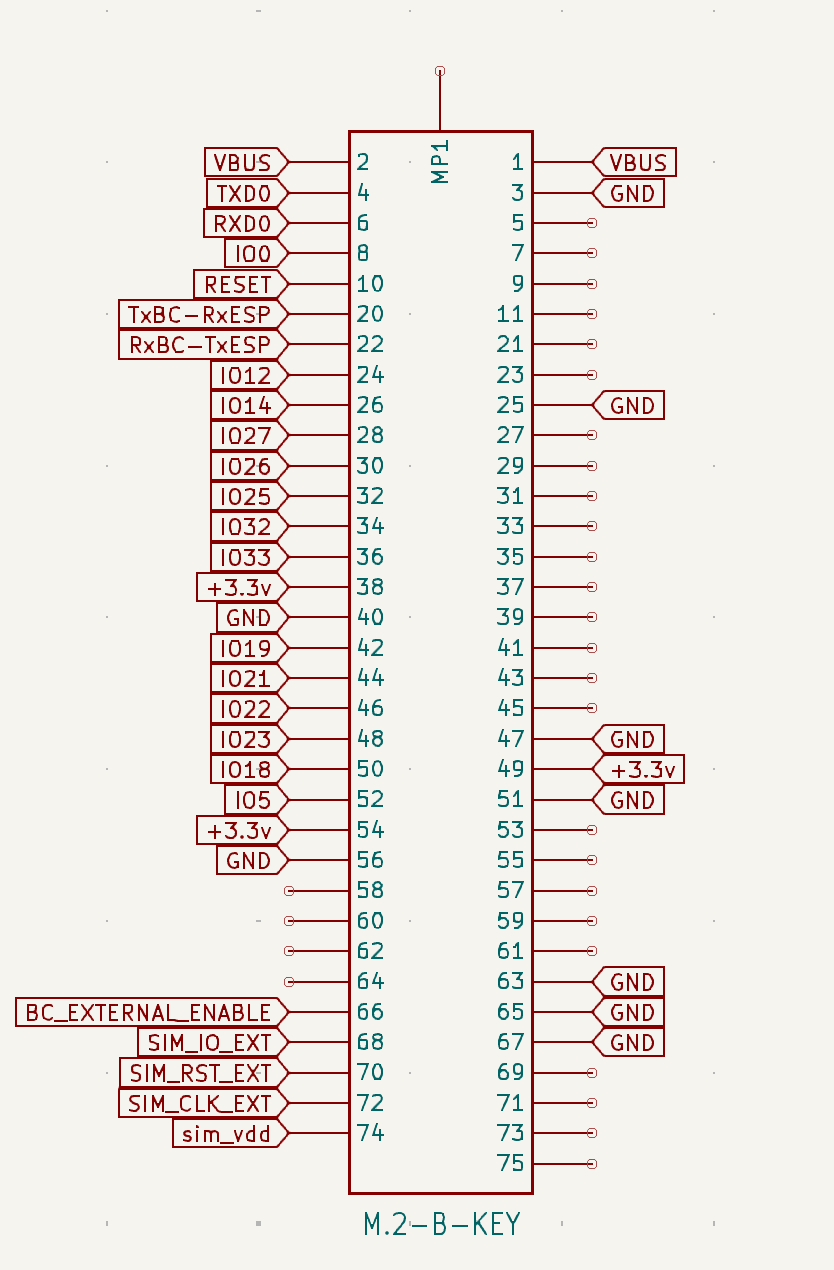
Pins not listed are not connected.
| M.2 pin | Signal | ESP32 GPIO | Notes |
|---|---|---|---|
| 1, 2 | VBUS | 5 V power input. | |
| 3, 25, 40, 47, 51, 56, 63, 65, 67 | GND | Ground. | |
| 4 | TXD0 | GPIO1 | UART0 TX: console and programming. |
| 6 | RXD0 | GPIO3 | UART0 RX: console and programming. |
| 8 | IO0 | GPIO0 | Boot mode. Hold it LOW at reset to enter the download mode. |
| 10 | RESET | EN | ESP32 reset, active LOW. |
| 20 | TxBC-RxESP | GPIO4 | Modem TXD to the ESP32. |
| 22 | RxBC-TxESP | GPIO13 | ESP32 to the modem RXD. |
| 24 | IO12 | GPIO12 | ADC2, touch. Strapping pin: do not drive it HIGH at boot. |
| 26 | IO14 | GPIO14 | ADC2, touch. |
| 28 | IO27 | GPIO27 | ADC2, touch. |
| 30 | IO26 | GPIO26 | ADC2, DAC2. |
| 32 | IO25 | GPIO25 | ADC2, DAC1. |
| 34 | IO32 | GPIO32 | ADC1, touch. |
| 36 | IO33 | GPIO33 | ADC1, touch. |
| 38, 49, 54 | +3.3V | 3.3 V output. | |
| 42 | IO19 | GPIO19 | |
| 44 | IO21 | GPIO21 | Shared with the user LED. |
| 46 | IO22 | GPIO22 | |
| 48 | PWRKEY | GPIO23 | Modem power key. |
| 50 | PSM_EINT | GPIO18 | Wakes the modem from power saving mode. |
| 52 | RESET_BC | GPIO5 | Modem reset. |
| 66 | BC_EXTERNAL_ENABLE | External power control of the modem. | |
| 68, 70, 72, 74 | SIM_IO_EXT, SIM_RST_EXT, SIM_CLK_EXT, SIM_VDD | Connected to the on-board eSIM. Do not connect another SIM to them. |
Modem control lines
| Function | ESP32 GPIO | Behavior |
|---|---|---|
| Modem UART RX | GPIO4 | Receives from the modem TXD, at 115200 baud by default. |
| Modem UART TX | GPIO13 | Sends to the modem RXD. |
| PWRKEY | GPIO23 | HIGH pulls the modem PWRKEY LOW (power on or off). |
| PSM_EINT | GPIO18 | HIGH pulls the modem PSM_EINT LOW (wake up from power saving mode). |
| RESET | GPIO5 | HIGH pulls the modem RESET LOW (hardware reset). |
The control lines are inverted: a HIGH level on the GPIO activates the modem input. While the modem is in use, do not drive GPIO4, GPIO5, GPIO13, GPIO18 or GPIO23 from external hardware.
Connect it to Thinger.io
The ThingerNBCore class of the Thinger.io Arduino library connects the module over NB-IoT. It powers up the modem, applies the APN and network settings, waits for the network and keeps the connection to Thinger.io. To connect over Wi-Fi instead, use the module as any ESP32 board with ThingerESP32 (see Arduino).
Before you start
- A carrier board for the module, powered through VBUS, and a USB-to-UART adapter on its TXD0 and RXD0 pins. The module has no USB interface.
- Antennas on WiFi-ANT and NB ANT. Always connect the NB-IoT antenna before you use the modem.
- NB-IoT coverage of the 1NCE network where you deploy the module. Coverage and bands depend on the country and the operator.
- The Arduino IDE with the esp32 board package by Espressif Systems, or Visual Studio Code with PlatformIO.
- The thinger.io library and a TinyGSM library with Quectel BC660 support. The TinyGSM release in the Arduino Library Manager does not support the BC660: install it from github.com/alvarolb/TinyGSM.
- A device in Thinger.io, created as in Arduino. You need your username (
YOUR_USER), the device ID (YOUR_DEVICE) and the device credentials (YOUR_TOKEN).
Upload the sketch
Select the board
In the Arduino IDE, select ESP32 Dev Module. In PlatformIO, use the
pico32board.Write the sketch
Define
THINGER_NB_M2COREbefore the include, so the library uses the pins of this module. The 1NCE APN (iot.1nce.net, no user or password) is the default.main.cppcpp// #define THINGER_SERVER "YOUR_SERVER" // only on a private instance #define THINGER_SERIAL_DEBUG #define THINGER_NB_M2CORE // pins of the M2 IoT Modem #include <ThingerNBCore.h> #include <ThingerESP32OTA.h> #define PIN_USER_LED 21 ThingerNBCore thing("YOUR_USER", "YOUR_DEVICE", "YOUR_TOKEN"); ThingerESP32OTA ota(thing, 512); void setup() { Serial.begin(115200); pinMode(PIN_USER_LED, OUTPUT); // power up and configure the modem while (!thing.init_modem()) { delay(1000); } // user LED, controlled from Thinger.io thing["led"] << digitalPin(PIN_USER_LED); // modem and network information thing["modem"] >> [](pson& out) { out["modem"] = thing.get_modem_info(); out["IMEI"] = thing.get_modem_imei(); out["CCID"] = thing.get_sim_iccid(); out["operator"] = thing.get_operator(); }; } void loop() { thing.handle(); }On the free Cloud account, leave the
THINGER_SERVERline commented: the library connects to the free Cloud server by default. On a private instance, uncomment it and replaceYOUR_SERVERwith your domain.Upload it
Hold GPIO0 (IO0) LOW while you reset the ESP32 with the RESET pin to enter the download mode, then upload the sketch. Open the serial monitor at 115200 baud to follow the connection.
The device shows as connected in Devices, with the led and modem device resources.
Network settings
Before init_modem(), set_apn() changes the APN for another SIM, set_preferred_bands() and set_preferred_operator() speed up the network search, and set_power_save(true) enables the modem power saving modes. The settings are stored in the modem and applied again only when they change.
To identify each module by the ICCID of its eSIM instead of a fixed device ID, see Use the SIM ICCID as device ID; on this module, keep #define THINGER_NB_M2CORE.
If the modem does not power on by itself, send a pulse on PWRKEY (GPIO23) before init_modem(). The timings are in the Quectel BC660K-GL hardware design document.
Resources
Disclaimer
INTERNET OF THINGER S.L. sells this module as a self-certified development kit, so it is not subject to the usual commercial homologation rules. The owner of the device is liable for any injury to third parties or damage to their property.