

The Thinger32 NB-IoT is a development board that combines an ESP32-PICO with a Quectel BC660K-GL NB-IoT modem. It gives you Wi-Fi, Bluetooth and NB-IoT on one board with USB programming, a nano SIM slot and 2.54 mm pin headers, ready for a breadboard. Use it for sensors and machines that need cellular coverage where there is no Wi-Fi: city and environmental monitoring, industrial equipment, farming, home automation or battery-powered wearables.
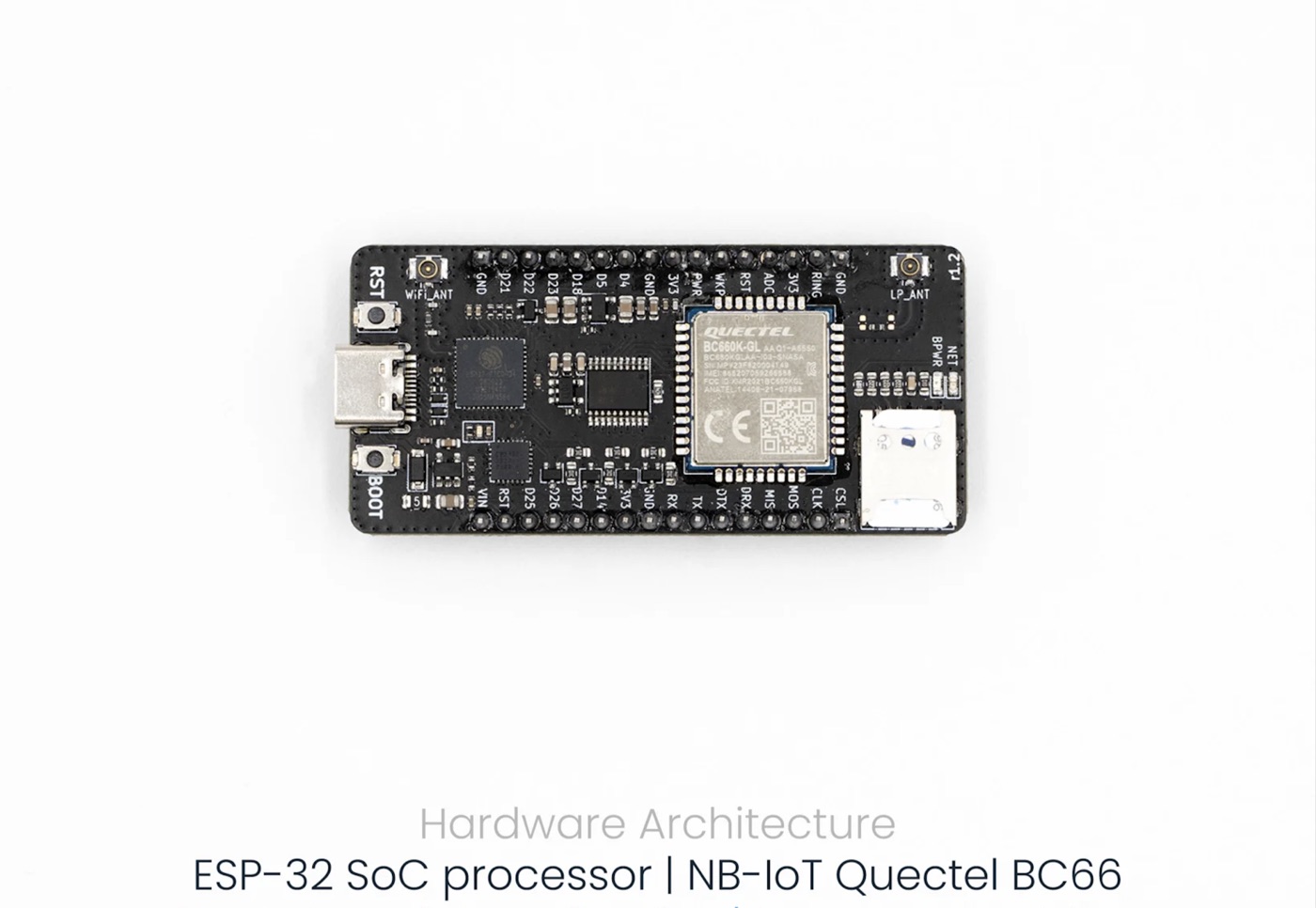
Specifications
| Feature | Specification |
|---|---|
| Size | 65.4 × 30.9 mm |
| Processor | ESP32-PICO, dual-core Xtensa LX6 from 80 to 240 MHz |
| Memory | 8 MB SPI flash, 2 MB PSRAM, 520 KB SRAM, 448 KB ROM, 16 KB RTC SRAM |
| Wi-Fi | 802.11 b/g/n, 2412–2484 MHz |
| Bluetooth | v4.2 BR/EDR and BLE |
| NB-IoT modem | Quectel BC660K-GL (LTE Cat NB2) |
| NB-IoT bands | B1/2/3/4/5/8/12/13/17/18/19/20/25/28/66/70/85 |
| SIM | Nano SIM (4FF) slot |
| GPIO | 10 configurable ESP32 GPIOs (UART, I2C, SPI) |
| Programming | Arduino framework, ESP-IDF or MicroPython |
| Buttons | RST (ESP32 reset) and BOOT (ESP32 boot mode) |
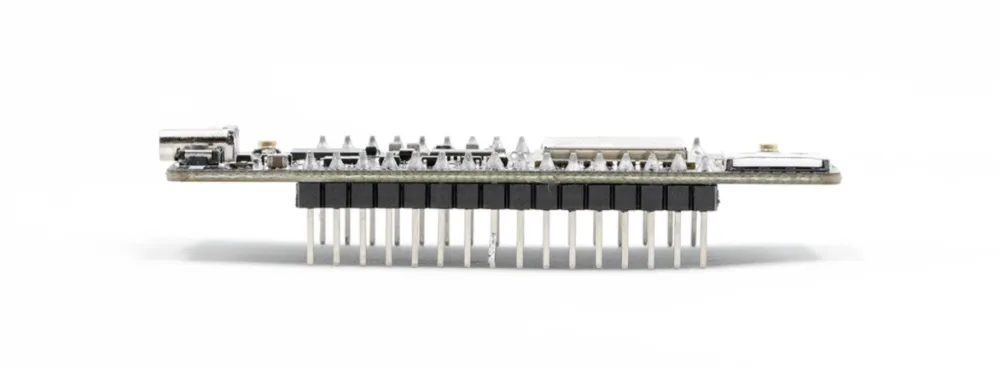
| Connections | USB with a CP2102 USB-to-UART bridge, U.FL antenna connectors for Wi-Fi/Bluetooth and for NB-IoT, 2 × 16 pins at 2.54 mm |
| LEDs | BPWR (modem power, red), NET (modem network status, amber), ESP32 UART TX (green) |
| Peripherals | SD card, UART, SPI, SDIO, I2C, LED PWM, motor PWM, I2S, IR, pulse counter, GPIO, capacitive touch, ADC, DAC, TWAI, Ethernet MAC |
Power
| Source | Voltage | Current |
|---|---|---|
| USB or VIN pin | 5 V | About 80 mA in normal operation, up to 600 mA with the radios at full power |
| 3V3 pins | 3.3 V | Output for external circuits |
Pinout
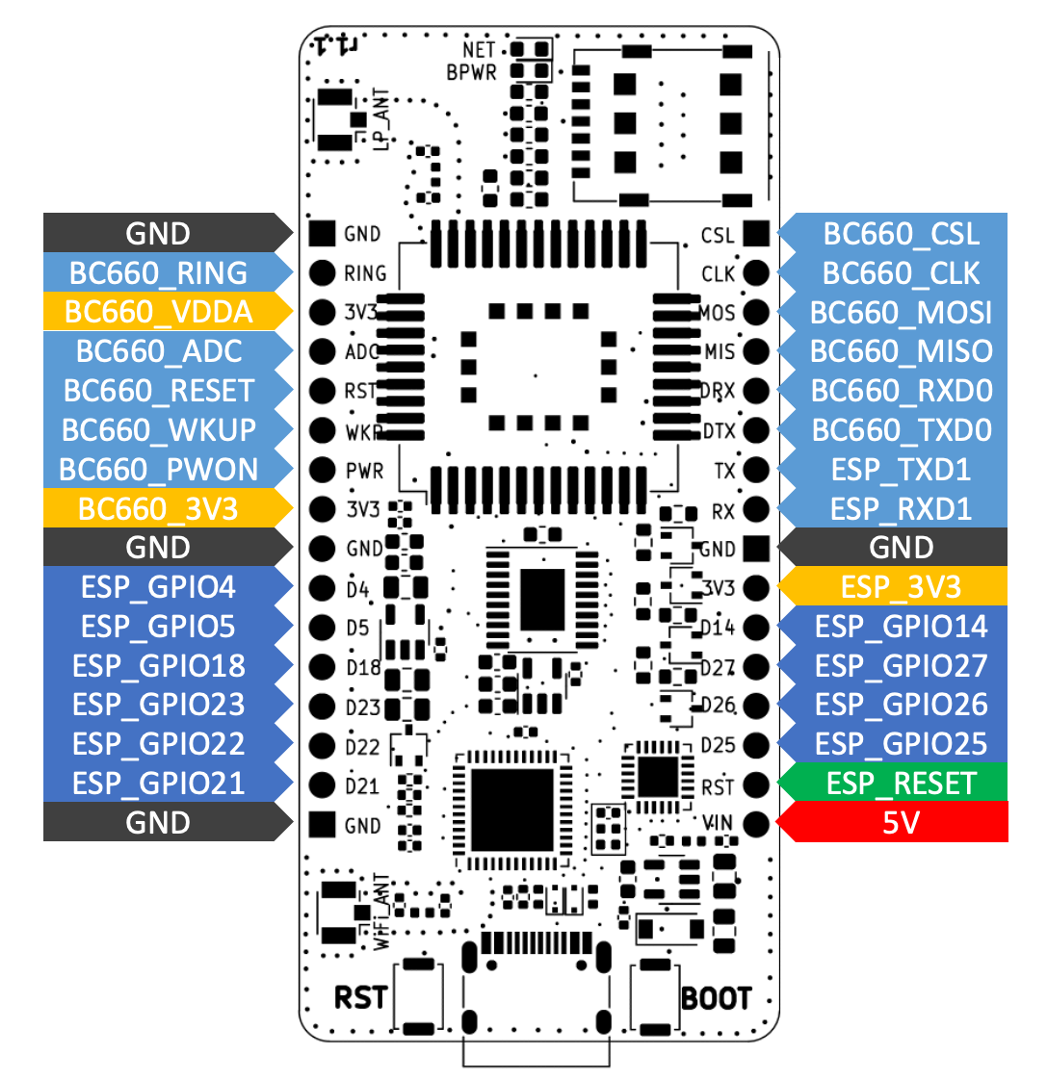
The firmware drives the modem through these ESP32 pins:
| Function | ESP32 GPIO |
|---|---|
| Modem UART RX (modem TXD) | GPIO32 |
| Modem UART TX (modem RXD) | GPIO33 |
| Modem reset | GPIO13 |
| Modem wake-up | GPIO12 |
| Modem power key | GPIO19 |
Connect it to Thinger.io
The ThingerNBCore class of the Thinger.io Arduino library connects the board over NB-IoT, with the pins of this board by default. It powers up the modem, applies the APN and network settings, waits for the network and keeps the connection to Thinger.io. To connect over Wi-Fi instead, use the board as any ESP32 with ThingerESP32 (see Arduino).
Before you start
- A nano SIM with an NB-IoT data plan, in the SIM slot, and both antennas connected.
- The Arduino IDE with the esp32 board package by Espressif Systems, or Visual Studio Code with PlatformIO.
- The CP2102 USB driver if your computer does not detect the board.
- The thinger.io library and a TinyGSM library with Quectel BC660 support. The TinyGSM release in the Arduino Library Manager does not support the BC660: install it from github.com/alvarolb/TinyGSM.
- A device in Thinger.io, created as in Arduino. You need your username (
YOUR_USER), the device ID (YOUR_DEVICE) and the device credentials (YOUR_TOKEN).
Upload the sketch
Connect the board
Connect the board to your computer with a USB data cable and select its serial port in the IDE. In PlatformIO, use the
pico32board.Write the sketch
Set the APN of your SIM operator. Without
set_apn(), the library uses the 1NCE APN (iot.1nce.net).main.cppcpp// #define THINGER_SERVER "YOUR_SERVER" // only on a private instance #define THINGER_SERIAL_DEBUG #include <ThingerNBCore.h> #include <ThingerESP32OTA.h> ThingerNBCore thing("YOUR_USER", "YOUR_DEVICE", "YOUR_TOKEN"); ThingerESP32OTA ota(thing, 512); void setup() { Serial.begin(115200); // APN of your SIM operator, with user and password if it needs them thing.set_apn("internet.example"); // power up and configure the modem while (!thing.init_modem()) { delay(1000); } // modem and network information thing["modem"] >> [](pson& out) { out["modem"] = thing.get_modem_info(); out["IMEI"] = thing.get_modem_imei(); out["CCID"] = thing.get_sim_iccid(); out["operator"] = thing.get_operator(); }; } void loop() { thing.handle(); }On the free Cloud account, leave the
THINGER_SERVERline commented: the library connects to the free Cloud server by default. On a private instance, uncomment it and replaceYOUR_SERVERwith your domain.Upload it
Click Upload. If the upload does not start, hold BOOT, press RST and release BOOT, then upload again. Open the serial monitor at 115200 baud to follow the connection.
The device shows as connected in Devices, with the modem device resource. The ota object lets you update the firmware over NB-IoT from the Visual Studio Code extension; see OTA updates.
Network settings
Before init_modem(), set_pin() unlocks a SIM with a PIN, set_preferred_bands() and set_preferred_operator() speed up the network search (for example thing.set_preferred_bands("3,20,8")), and set_power_save(true) enables the modem power saving modes. The settings are stored in the modem and applied again only when they change.
Use the SIM ICCID as device ID
For a fleet, you can flash the same firmware on every board and let each one identify itself with the ICCID of its SIM. The set_credentials() function of the library changes the user, the device ID and the device credentials before the board connects. This sketch, adapted from the NBCore example of the library, uses the ICCID for both:
// #define THINGER_SERVER "YOUR_SERVER"  // only on a private instance
#define THINGER_SERIAL_DEBUG

#include <ThingerNBCore.h>
#include <ThingerESP32OTA.h>

// device ID and credentials are set from the SIM in setup()
ThingerNBCore thing("YOUR_USER", "", "");
ThingerESP32OTA ota(thing, 512);

// global: the library keeps a pointer to it
String iccid;

void setup() {
  Serial.begin(115200);

  // power up and configure the modem
  while (!thing.init_modem()) {
    delay(1000);
  }

  // the SIM ICCID becomes the device ID and the device credentials
  iccid = thing.get_sim_iccid();
  thing.set_credentials("YOUR_USER", iccid.c_str(), iccid.c_str());

  thing["voltage"] >> outputValue(thing.get_batt_voltage());
  thing["operator"] >> outputValue(thing.get_operator());
}

void loop() {
  thing.handle();
}
Keep the ICCID in a global variable, as above: the library does not copy the values you pass to set_credentials().
Each board needs a device whose ID is the ICCID of its SIM. Instead of creating them one by one, add a product with an Auto Provision rule whose pattern matches the ICCIDs of your SIMs: each board creates its device the first time it connects. See Provisioning.
Weak credentials
The ICCID is printed on the SIM and the operator and other systems can read it, so a credential equal to the ICCID is easy to guess. Use it for tests and closed deployments. In production, give each board its own secret credential, for example stored in flash during manufacturing.