

In this tutorial you build a web app that lists the latest temperatures of a Data Bucket and updates itself when new records arrive. You publish it to a File Storage and open it as a URL dashboard inside the console. It takes about 20 minutes.
The app uses the Dashboard SDK (@thinger-io/dashboard-sdk), which needs Thinger.io 7.4 or later. The app never handles credentials: inside the console it receives the session of the person viewing it, so it can read exactly what that person can read.
What you need
- A Thinger.io account. On the free Cloud account your server is
iot.thinger.io; on a private instance, use your own domain wherever this tutorial saysYOUR_SERVER. - A Data Bucket with a numeric
temperaturefield, such as theclimatebucket of From an ESP32 to a dashboard. - Node.js 20 or later, and the
thingerCLI signed in to your account.
Create the project
Create a Vite project
bashnpm create vite@latest climate-app -- --template vanilla-ts cd climate-app npm installAny bundler works.
thinger dashboard initcreates a ready-made React or Angular project instead; see Dashboard apps.Install the SDK
bashnpm install @thinger-io/dashboard-sdkUse relative asset URLs
A File Storage serves the app from a folder, so build it with relative URLs:
vite.config.tstsimport { defineConfig } from 'vite'; export default defineConfig({ base: './', });
Read the bucket
Write the page
Replace
index.htmlwith a heading, a status line and an empty table:index.htmlhtml<!doctype html> <html lang="en"> <head> <meta charset="UTF-8" /> <meta name="viewport" content="width=device-width, initial-scale=1.0" /> <title>Climate</title> </head> <body> <h1>Climate</h1> <p id="status">Connecting…</p> <table> <thead><tr><th>Time</th><th>Temperature (°C)</th></tr></thead> <tbody id="rows"></tbody> </table> <script type="module" src="/src/main.ts"></script> </body> </html>Subscribe to the bucket
Replace
src/main.ts. The app waits forThinger.ready(), then subscribes to the last 6 hours of the bucket: the callback runs with the records at once and again whenever the bucket is written.src/main.tstsimport { Thinger } from '@thinger-io/dashboard-sdk'; import './style.css'; const BUCKET = 'climate'; type Reading = { ts: number; temperature: number }; const status = document.querySelector<HTMLParagraphElement>('#status')!; const rows = document.querySelector<HTMLTableSectionElement>('#rows')!; function render(data: Reading[]) { rows.replaceChildren( ...data.map((r) => { const tr = document.createElement('tr'); tr.innerHTML = `<td>${new Date(r.ts).toLocaleString()}</td><td>${r.temperature.toFixed(1)}</td>`; return tr; }), ); status.textContent = `${data.length} readings from the last 6 hours`; } try { await Thinger.ready(); Thinger.buckets.subscribe<Reading>(BUCKET, { from: '6h', items: 50 }, (data, err) => { if (err) { status.textContent = `Cannot read ${BUCKET}: ${err.message}`; return; } render(data ?? []); }); } catch { status.textContent = 'Open this app from a Thinger.io dashboard.'; }Replace
src/style.csswith your own styles, and delete the other files of the Vite example insrc/. The Dashboard SDK reference lists every module (devices, buckets, properties, alarms, storages…) and the rules an app follows inside the console, such as hash routing and nolocalStorage.Build it
bashnpm run buildThe build is in
dist/.
Publish it
The app goes to a public File Storage, and a URL dashboard points at its folder.
Console
The console shows dashboard apps but does not create URL dashboards. Go to File Storages, click Create a File Storage, create a public storage called climate_app and upload the contents of dist/ to it, keeping the assets folder. Then create the dashboard with the API, the CLI or an agent.
API
Upload each file of dist/ to a public storage named climate_app (see File Storages), then create the dashboard with source: "url" and the folder of the storage, with the trailing slash:
curl -X POST "https://YOUR_SERVER/v1/users/YOUR_USER/dashboards" \
  -H "Authorization: Bearer YOUR_TOKEN" \
  -H "Content-Type: application/json" \
  -d '{
    "dashboard": "climate_app",
    "name": "Climate app",
    "source": "url",
    "url": "/v1/users/YOUR_USER/storages/climate_app/files/"
  }'
CLI
thinger dashboard publish dist --storage climate_app --to dashboard:climate_app --name "Climate app"The command creates the public storage if it is missing, uploads dist/ and creates the dashboard pointing at it. It prints the console link of the dashboard. Add --preview to also get a temporary read-only link that opens the app outside the console. See the CLI reference.
AI
Publish the dist folder of my climate-app project to a public storage called climate_app and create a dashboard called climate_app that shows it.
The agent uses thinger_dashboard_publish. See Build dashboards with AI.
To publish a new version, build again and run the same publish command: consoles that have the app open load the new files on their next reload.
Result
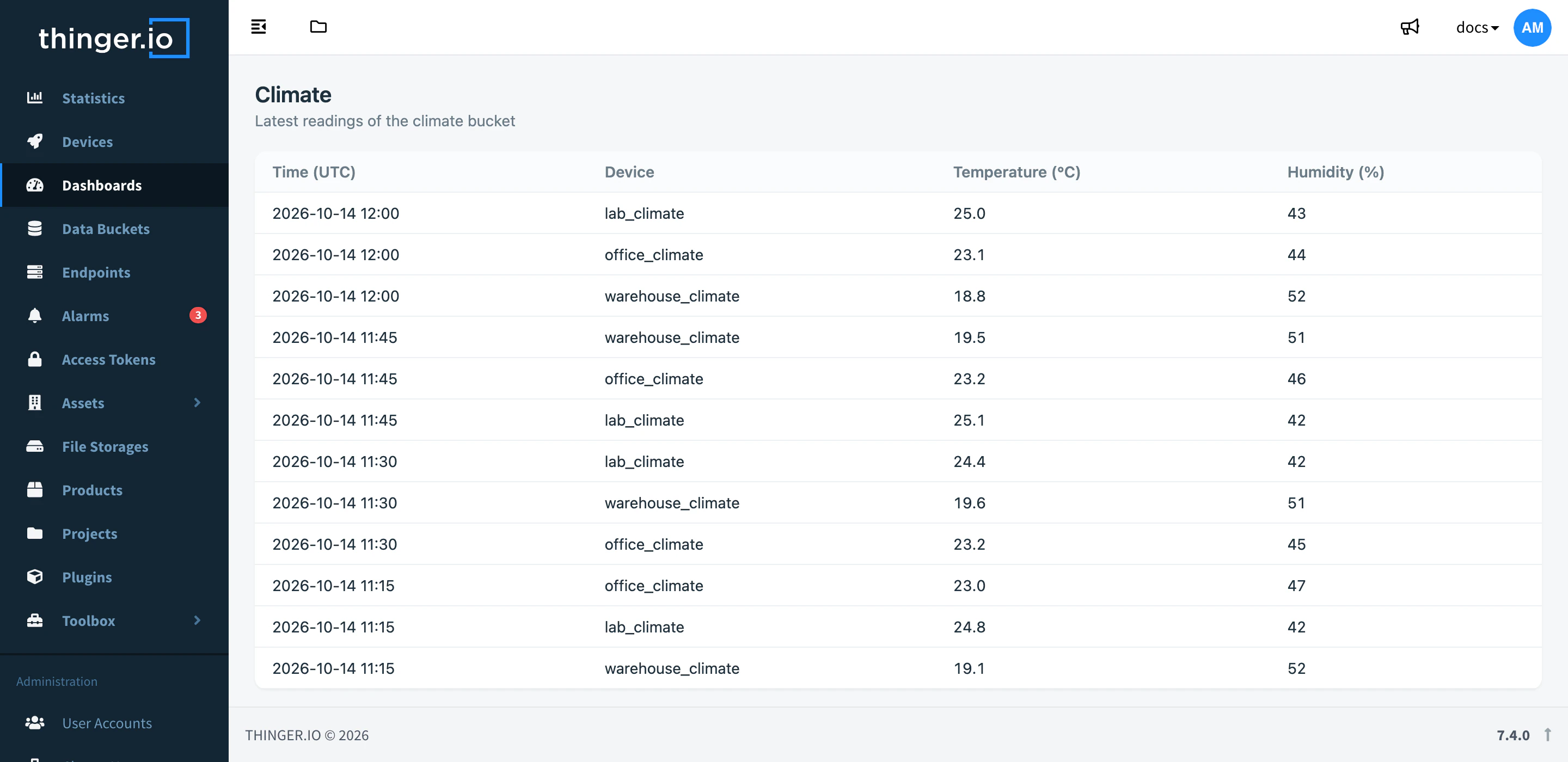
Go to Dashboards and open Climate app. The console shows your app in its layout, with the latest temperatures of the bucket, and a new row appears each time the bucket gets a record.
If the app shows "Open this app from a Thinger.io dashboard", you opened the storage file directly, without a session: open it from Dashboards or with a preview link.