

A dashboard app is a dashboard written as a web application instead of designed with widgets. The app is a folder of a File Storage with its index.html; a URL dashboard points at it, and the console shows it inside its own layout. With the Dashboard SDK (@thinger-io/dashboard-sdk), the app reads devices, buckets, properties and alarms of the person viewing it, with live updates.
When to use it
- When widgets are not enough: your own layout, navigation, tables or logic.
- To build a fleet or customer view with your usual web tools (Angular, React, Vite…).
- To embed the same app in another website, outside the console.
How it works
A dashboard has a source: widgets for the dashboards of the widget editor, or url for a dashboard app. A URL dashboard has a url, usually the folder of a public File Storage that holds the app.
When someone opens the dashboard, the console loads the app in a sandboxed frame and hands it the session of that person, the user, the current project and the subject of the dashboard (the device, product, asset type or asset group it belongs to). The console keeps the route of the app in its own URL, so a reload or a shared console link reopens the same screen.
The app runs with the viewer's session
A URL dashboard receives the session token of the person viewing it (only for pages served from the same instance). The app can do anything that person can do. Publish only code you trust, and treat apps in public storages with care: anyone can read their files, and anything you put in them is visible.
Outside the console, the same app runs standalone with an access token passed in its URL, for example to embed it in another website. Give that token only the permissions the app needs; see Access Tokens.
Publish a dashboard app
YOUR_SERVER is iot.thinger.io on the free Cloud account, or the domain of your private instance.
Console
The console shows dashboard apps but does not create them: its Dashboards form creates widget dashboards only. Upload the app to a File Storage from File Storages, then point a dashboard at it with the API, the CLI or an agent.
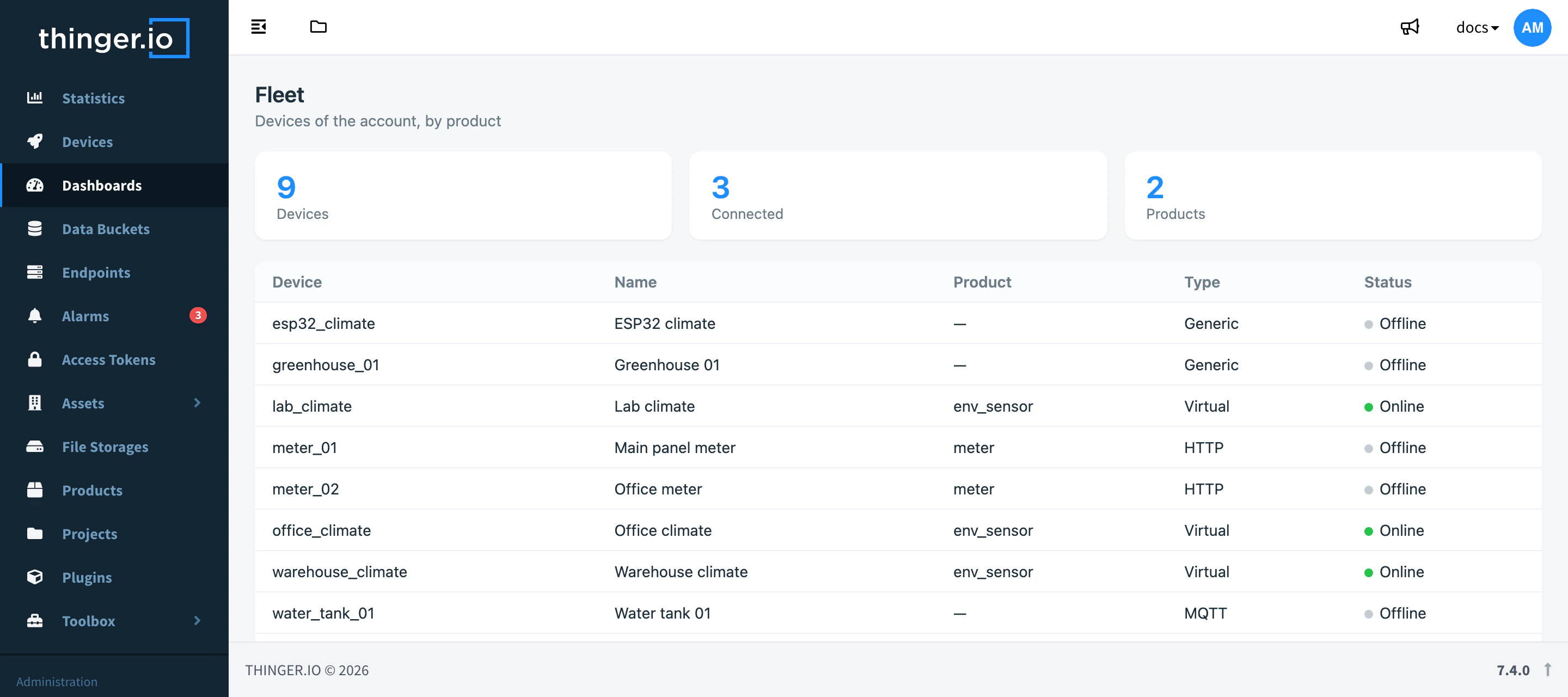
API
Upload the build of the app to a public File Storage, then create the dashboard with source: "url" and the URL of the storage folder, with the trailing slash:
curl -X POST "https://YOUR_SERVER/v1/users/YOUR_USER/dashboards" \
  -H "Authorization: Bearer YOUR_TOKEN" \
  -H "Content-Type: application/json" \
  -d '{
    "dashboard": "fleet",
    "name": "Fleet",
    "source": "url",
    "url": "/v1/users/YOUR_USER/storages/fleet_app/files/"
  }'
url starts with / (a path of the instance) or with https://.
CLI
thinger dashboard init fleet-app
cd fleet-app
npm install
npm run dev
init creates a TypeScript project on the Dashboard SDK with a thinger.json manifest. While npm run dev runs, thinger dashboard dev --device YOUR_DEVICE prints a link that opens the app from your dev server against your account, with a temporary token. To publish it:
npm run build
thinger dashboard publish --to dashboard:fleet
publish uploads the build to the public storage named in thinger.json (created if missing) and points the dashboard at it, creating the dashboard if it does not exist. --to device:YOUR_DEVICE or --to product:<id> sets the app as the dashboard of a device or a product instead. See the CLI reference.
AI
Build a dashboard app that lists my devices with their connection status and shows the last 24 hours of the greenhouse_climate bucket for the selected one, and publish it as the fleet dashboard.
The agent uses thinger_dashboard_init and thinger_dashboard_publish. See Build dashboards with AI.
Build with the Dashboard SDK
The SDK is an npm package that gives the app typed access to devices, buckets (with real-time subscriptions), properties, alarms, storages and projects, using the session the console hands over or the access token of a standalone link:
npm install @thinger-io/dashboard-sdkThe Dashboard SDK reference has the modules and functions, the rules an app must follow inside the console, how to publish it and how to build standalone links. For a complete walkthrough, see Build a dashboard app.
Limits
- The app must be in a public File Storage: the frame cannot send credentials when it loads the files.
- Files are served with HTTP revalidation, so the console reloads the app only when its files change.
- People who open a shared dashboard app may lack some permissions; the app has to handle refused calls.