

An alarm rule notifies through endpoints: when an alarm is activated, when the rule clears it and, optionally, at regular intervals while it stays active. Each endpoint receives the alarm as its payload, so an email or a webhook can say which rule, device, severity and values triggered it.
When to use it
- To email the people on duty when an alarm is activated, and again when it clears.
- To post alarms to a ticketing tool, a chat or your own service through a webhook.
- To remind someone of an alarm that nobody has acknowledged.
When a rule notifies
Each rule has three lists of notifications, one per event. Each entry calls an endpoint:
| Event | notification.type | Sent when | List |
|---|---|---|---|
| Activation | activation | The alarm becomes Activated: when its activation is confirmed. | Activation tab, config.activation.notifications |
| Normalization | normalization | The rule clears the alarm because its normalization is confirmed. Clearing an alarm by hand sends nothing. | Normalization tab, config.normalization.notifications |
| Reminder | reminder | Every reminder interval, for each alarm that is still Activated and has not been notified in the last interval. | Reminder tab, config.reminder.notifications |
An alarm that returns to Activated after its reactivation time sends no new activation notification; its reminders start again. A notification is sent once: if the endpoint fails, it is not repeated, and the alarm keeps its state. Every call emits the endpoint_call and endpoint_call_response events, which you can use to monitor them.
Add notifications to a rule
YOUR_SERVER is iot.thinger.io on the free Cloud account, or the domain of your private instance.
Console
Create the endpoint
Create the endpoint that sends the message in Endpoints, such as an email or an HTTP request. See Send an email and Send a webhook for endpoints made for alarms.
Add it to the rule
Open the rule in Alarms > Rules. In the Activation tab, click Add Notification under Notification and choose the endpoint. Do the same in the Normalization tab to notify when the alarm clears. Click Update Rule.
Set reminders
In the Reminder tab, choose Interval instead of None, set the time between reminders, such as 4 hours, and add the endpoints under Notification. Click Update Rule.
API
Notifications are part of the config of the rule. Each entry is {"type": "endpoint", "id": "<endpoint ID>"}:
{
  "activation": {
    "conditions": [ { "operator": "and", "type": "value_check", "field": "climate.temperature", "comparison": "above", "value": "30" } ],
    "confirmation": { "mode": "immediate" },
    "notifications": [ { "type": "endpoint", "id": "alarm_email" }, { "type": "endpoint", "id": "alarm_webhook" } ]
  },
  "normalization": {
    "conditions": [],
    "confirmation": { "mode": "immediate" },
    "notifications": [ { "type": "endpoint", "id": "alarm_email" } ]
  },
  "reminder": {
    "type": "interval",
    "interval": { "value": 4, "magnitude": "hour" },
    "notifications": [ { "type": "endpoint", "id": "alarm_email" } ]
  }
}
Send the whole config with PUT /v1/users/{user}/alarms/rules/{rule}: it replaces the stored one, so read the rule first. See Alarm rules for the full body.
AI
Add my alarm_email endpoint to the activation and normalization notifications of the climate_hot alarm rule, and send a reminder through it every 4 hours while an alarm stays active.
The agent reads the rule and updates its config with thinger_resource_update and the alarm_rule type. See MCP tools.
What the endpoint receives
The payload of each call is the alarm, as JSON. For the activation of an alarm of the climate_hot rule on greenhouse_01:
{
  "instance": "CH-1593458210",
  "name": "Climate too hot",
  "description": "Mean temperature above 30 °C for 3 checks in a row",
  "severity": 3,
  "state": 1,
  "origin": { "id": "greenhouse_01", "name": "Greenhouse 01", "source": "device" },
  "alarm": { "rule": "climate_hot", "type": "", "group": "" },
  "asset_type": "climate_sensor",
  "asset_group": "madrid_plant",
  "project": [],
  "created": 1792310100000,
  "modified": 1792310700000,
  "activation": { "detections": 3, "initiated": 1792310100000, "completed": 1792310700000 },
  "normalization": { "detections": 0, "initiated": 0, "completed": 0 },
  "evaluation": { "last_completed": 1792310400000, "last_values": { "climate.temperature": 31.2 }, "total_duration": 300000 },
  "notification": { "type": "activation", "last_completed": 0, "last_failed": 0, "total_completed": 0, "total_failed": 0 }
}| Field | Content |
|---|---|
instance | ID of the alarm: the initials of the rule and a number. |
name, description | Name and description of the rule. |
severity | 0 none, 1 low, 2 medium, 3 high, 4 critical. |
state | 1 (Activated) in activations and reminders, 5 (Cleared) in normalizations. |
origin.id, origin.name | ID and name of the device. origin.source is device. |
alarm.rule | ID of the rule. |
asset_type, asset_group | Asset type and asset group of the device, empty if it has none. |
project | Projects of the alarm: those of the rule and of the device. |
created, modified, resolved | When the alarm was raised, last changed and, once cleared, resolved. |
activation | initiated: first check where the conditions held; completed: when the alarm was activated; detections: checks counted. |
normalization | The same for clearing; zeros until the normalization starts. |
evaluation.last_values | Values that the activation conditions read in the last check, by <source>.<field>. |
evaluation.last_completed | Time of the last check of the alarm. |
notification.type | activation, normalization or reminder. |
notification.last_completed, notification.total_completed | Time and count of the notifications already sent for this alarm. |
annotation, reactivation | When someone acknowledged, latched or shelved the alarm: their note and reactivation time. |
Times are unix timestamps in milliseconds.
Placeholders for alarms
Endpoints take fields of the payload with placeholders, in the subject, body, URL, headers or template parameters:
| Placeholder | Becomes |
|---|---|
{{name}} | Name of the rule: Climate too hot. |
{{origin.name}}, {{origin.id}} | Name and ID of the device: Greenhouse 01, greenhouse_01. |
{{severity}} | Severity as a number: 3. |
{{notification.type}} | activation, normalization or reminder. |
{{instance}} | ID of the alarm. |
{{alarm.rule}} | ID of the rule: climate_hot. |
{{evaluation.last_values}} | The values read, as JSON: {"climate.temperature":31.2}. |
{{activation.completed}} | Time of the activation, in unix milliseconds. |
{{}} | The whole alarm as JSON. |
One endpoint can serve several rules and the three events: the placeholders tell them apart.
Send an email
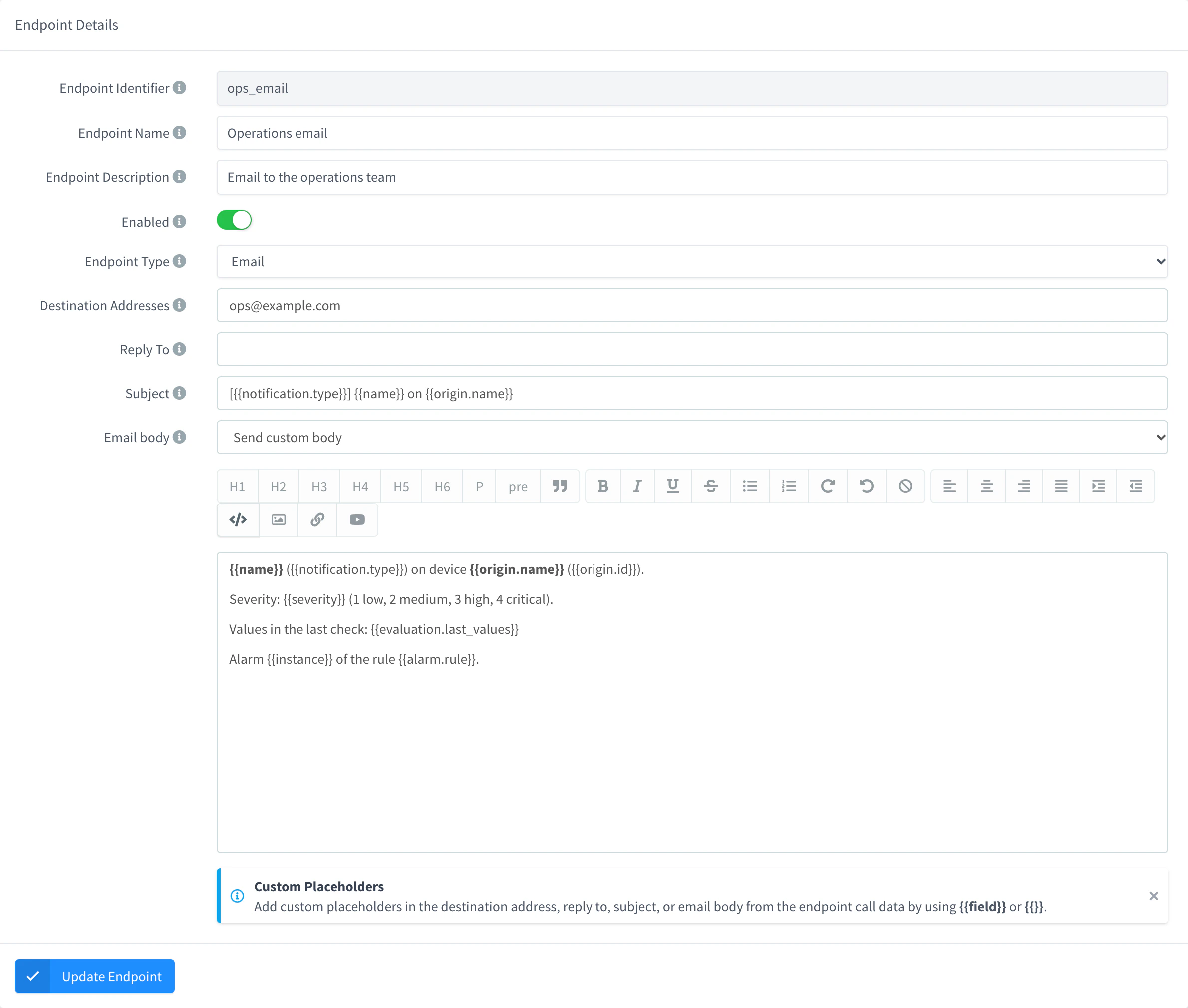
This email endpoint, alarm_email, works for any rule and any event:
| Setting | Value |
|---|---|
| Destination Addresses | ops@example.com |
| Subject | [{{notification.type}}] {{name}} on {{origin.name}} |
| Email body | Send custom body, with the HTML below |
<p><b>{{name}}</b> ({{notification.type}}) on device <b>{{origin.name}}</b> ({{origin.id}}).</p>
<p>Severity: {{severity}} (1 low, 2 medium, 3 high, 4 critical).</p>
<p>Values in the last check: {{evaluation.last_values}}</p>
<p>Alarm {{instance}} of the rule {{alarm.rule}}.</p>
The activation of the example above arrives with the subject [activation] Climate too hot on Greenhouse 01, and the body says Values in the last check: {"climate.temperature":31.2}. With Resend call data (JSON) as the Email body, the email contains the whole alarm as JSON instead.
Console
Go to Endpoints, click Add Endpoint, set the Endpoint Identifier to alarm_email and choose the Email type. Fill in the settings of the table and click Add Endpoint.
API
curl -X POST "https://YOUR_SERVER/v1/users/YOUR_USER/endpoints" \
  -H "Authorization: Bearer YOUR_TOKEN" \
  -H "Content-Type: application/json" \
  -d '{
    "endpoint": "alarm_email",
    "name": "Alarm email",
    "enabled": true,
    "type": "email",
    "config": {
      "recipient": "ops@example.com",
      "subject": "[{{notification.type}}] {{name}} on {{origin.name}}",
      "body_type": "html",
      "body": "<p><b>{{name}}</b> ({{notification.type}}) on device <b>{{origin.name}}</b> ({{origin.id}}).</p><p>Severity: {{severity}} (1 low, 2 medium, 3 high, 4 critical).</p><p>Values in the last check: {{evaluation.last_values}}</p><p>Alarm {{instance}} of the rule {{alarm.rule}}.</p>"
    }
  }'
AI
Create an email endpoint called alarm_email that sends to ops@example.com, with the rule name, the event type and the device name in the subject, and the severity and the values that triggered the alarm in the body.
The agent uses thinger_resource_create with the endpoint type. See MCP tools.
Send a webhook
An HTTP Request endpoint with Resend call data (JSON) posts the whole alarm to your service, which reads notification.type, origin.id and the rest of the fields. To send only some of them, use Send custom body with placeholders:
| Setting | Value |
|---|---|
| Request URL | https://hooks.example.com/alarms (method POST) |
| Request Headers | Content-Type: application/json |
| Request Body | Send custom body: {"event": "{{notification.type}}", "rule": "{{alarm.rule}}", "device": "{{origin.id}}", "severity": {{severity}}, "values": {{evaluation.last_values}}} |
The activation of the example above posts {"event": "activation", "rule": "climate_hot", "device": "greenhouse_01", "severity": 3, "values": {"climate.temperature":31.2}}. Text placeholders go between quotes; numbers and objects do not.
Test a notification
Send the notifications of a rule as if an alarm had been raised, to check the endpoints and the messages. They are real: people receive the email and the webhook is called. Nothing is stored.
Console
Open the rule, go to the Evaluation tab and click Evaluate. In the Activations or Normalizations tab, click Notification on a device: the console sends the notifications of that event with the values of that device.
API
curl -X POST "https://YOUR_SERVER/v1/users/YOUR_USER/alarms/rules/climate_hot/test-notification" \
  -H "Authorization: Bearer YOUR_TOKEN" \
  -H "Content-Type: application/json" \
  -d '{
    "name": "Climate too hot",
    "description": "Mean temperature above 30 °C",
    "config": { "severity": 3, "normalization": { "notifications": [ { "type": "endpoint", "id": "alarm_email" } ] } },
    "event": { "type": "normalization", "origin": "greenhouse_01", "values": { "climate.temperature": 27.5 } }
  }'
event.type chooses the list of config that is sent: activation, normalization or reminder. event.origin is the device and event.values becomes evaluation.last_values. The answer has the alarm_instance that the endpoints received; its instance contains TEST.
AI
Send a test activation notification of the climate_hot alarm rule for greenhouse_01, with a temperature of 31.2, so I can check the email.
The agent uses thinger_resource_call with the alarm_rule type and the test_notification action, and asks you before it sends. See MCP tools.
Limits
- Only endpoints can be notified (
typeendpoint). - A notification that fails, because the endpoint is disabled, does not answer or answers with an error, is not sent again.
- Your account can have a minimum interval between calls to an endpoint. When several alarms notify the same endpoint at once, the calls that come too soon fail with
rate limit reached. See Endpoints. - A field that is not in the payload becomes
nullin a placeholder.