

An access token lets a script, an app or an AI agent call the REST API with a limited set of permissions, without your password. Each token has its own permissions, can expire on a given date and can be disabled or deleted at any time.
When to use it
- To call the API from a script, a backend service or a CI job.
- To give an agent or a dashboard app access to only some devices or buckets.
- To hand out temporary access that stops working on its own.
Permissions
A token has a list of allowed permissions (allow) and, optionally, denied ones (deny). Each permission names a resource type, a resource ID (or * for all of them) and the actions allowed on it:
{
  "Device": { "greenhouse_01": ["Read*", "AccessDeviceResources"] },
  "Bucket": { "greenhouse_climate": ["ReadBucket"] }
}
Actions accept a trailing *: Read* covers every action that starts with Read, and "*" alone covers every action. The * resource type applies to every type: {"*": {"*": ["Read*"]}} reads everything, and {"*": {"*": "*"}} gives full access to the account; avoid it outside your own tools.
A call is allowed when the token is enabled and has not expired, no deny permission matches it and some allow permission does:
A token never gives more access than the account that owns it: an action the account cannot do is refused even if the token allows it.
Resource types and actions
Each row is a resource type with the actions it accepts in allow and deny, and the wildcards the console offers for it. The REST API reference gives the action of every operation, as Operation.
| Type | Actions | Wildcards |
|---|---|---|
Alarm | CloneAlarmRule, CloneAlarmRuleConfig, CreateAlarmInstance, CreateAlarmRule, DeleteAlarmInstance, DeleteAlarmRule, ListAlarmInstances, ListAlarmRules, ReadAlarmInstanceConfig, ReadAlarmInstanceStats, ReadAlarmRuleConfig, TestRule, TestRuleNotification, TestRuleSource, UpdateAlarmInstance, UpdateAlarmInstanceProjects, UpdateAlarmRule, UpdateAlarmRuleProjects | Clone*, Create*, Delete*, List*, Read*, Test*, Update* |
Asset | ReadAssetsLocations | — |
Brand | CreateBrand, DeleteBrand, ListBrands, TestBrandEmail, UpdateBrand | — |
Bucket | CloneBucket, CloneBucketConfig, CreateBucket, CreateBucketExport, CreateBucketImport, DeleteBucket, DeleteBucketExport, ListBucketExports, ListBucketTags, ListBuckets, ReadBucket, ReadBucketConfig, ReadBucketExport, ReadBucketTag, UpdateBucket, UpdateBucketProjects, WriteBucket | Clone*, Create*, Delete*, List*, Read*, Update* |
Claim | CloneClaim, CloneClaimConfig, CreateClaim, DeleteClaim, ListClaims, ReadClaim, ReadClaimConfig, RequestClaim, UpdateClaim, UpdateClaimProjects | Clone*, Read*, Update* |
Dashboard | CloneDashboard, CloneDashboardConfig, CreateDashboard, DeleteDashboard, ListDashboards, ReadDashboardConfig, UpdateDashboard, UpdateDashboardProjects | Clone*, Update* |
Device | AccessDeviceRemoteDesktop, AccessDeviceResources, AccessDeviceWebServices, CallDeviceCallback, CloneDevice, CloneDeviceConfig, CloneDeviceProperty, CloneDevicePropertyConfig, CreateDevice, CreateDeviceProperty, CreateDeviceToken, DeleteDevice, DeleteDeviceFiles, DeleteDeviceProperty, DeleteDeviceToken, ListDeviceBucketTags, ListDeviceBuckets, ListDeviceProperties, ListDeviceServices, ListDeviceTokens, ListDevices, ReadDeviceBucket, ReadDeviceBucketTag, ReadDeviceCallbackConfig, ReadDeviceCallbackResponse, ReadDeviceFiles, ReadDeviceProperty, ReadDeviceService, ReadDeviceStatistics, ReadDeviceStatus, RenameDeviceFiles, UpdateDevice, UpdateDeviceCallback, UpdateDeviceFiles, UpdateDeviceProjects, UpdateDeviceProperty | Access*, Clone*, Create*, Delete*, List*, Read*, Update* |
Domain | CreateDomain, DeleteDomain, ListDomains, ReadDomainConfig, UpdateDomain, VerifyDomain | — |
Endpoint | CallEndpoint, CloneEndpoint, CloneEndpointConfig, CreateEndpoint, DeleteEndpoint, ListEndpointTemplates, ListEndpoints, ReadEndpointConfig, ReadEndpointTemplateConfig, UpdateEndpoint, UpdateEndpointProjects | Clone*, List*, Read*, Update* |
Group | CloneGroup, CloneGroupConfig, CloneGroupProperty, CloneGroupPropertyConfig, CreateGroup, CreateGroupProperty, DeleteGroup, DeleteGroupProperty, ListGroupProperties, ListGroups, ReadAssetsLocations, ReadGroupConfig, ReadGroupProperty, UpdateGroup, UpdateGroupProjects, UpdateGroupProperty | Clone*, Create*, Delete*, List*, Read*, Update* |
Host | CreateHost, DeleteHost, ListHosts, ReadHostConfig, ReadHostLogs, ReadHostSettings, UpdateHost, UpdateHostSettings, UpdateHostState | Read*, Update* |
IdentityProvider | CreateIdentityProvider, DeleteIdentityProvider, ListIdentityProviders, ReadIdentityProviderConfig, UpdateIdentityProvider | — |
OauthClient | CreateOauthClient, DeleteOauthClient, ListOauthClients, ReadOauthClientConfig, UpdateOauthClient | — |
Plugin | CallPluginEndpoint, ClonePluginProperty, ClonePluginPropertyConfig, CreatePluginProperty, DeletePluginProperty, ListPluginProperties, ListPlugins, ManagePluginState, ReadPluginFiles, ReadPluginInfo, ReadPluginLogs, ReadPluginProperty, RunPluginCommand, RunPluginShell, UpdatePluginProperty | Clone*, List*, Read*, Run* |
Product | AccessProductResources, CloneProduct, CloneProductConfig, CloneProductProperty, CloneProductPropertyConfig, CreateProduct, CreateProductFirmware, CreateProductProperty, DeleteProduct, DeleteProductFirmware, DeleteProductProperty, DeleteProductServices, ExportProduct, FlashProductFirmware, ListProductFirmwares, ListProductProperties, ListProducts, ReadProductConfig, ReadProductFirmwareConfig, ReadProductProfile, ReadProductProperty, ReadProductServices, UpdateProduct, UpdateProductFirmware, UpdateProductProfile, UpdateProductProjects, UpdateProductProperty, UpdateProductServices | Clone*, Create*, Delete*, List*, Read*, Update* |
Project | CloneProject, CloneProjectConfig, CloneProjectProperty, CloneProjectPropertyConfig, CloneProjectRole, CloneProjectRoleConfig, CreateProject, CreateProjectMember, CreateProjectProperty, CreateProjectRole, DeleteProject, DeleteProjectMember, DeleteProjectProperty, DeleteProjectRole, ListProjectMembers, ListProjectProperties, ListProjectRoles, ListProjects, ReadProjectConfig, ReadProjectMemberConfig, ReadProjectProperty, ReadProjectRoleConfig, UpdateProject, UpdateProjectMember, UpdateProjectProperty, UpdateProjectRole | Clone*, Create*, Delete*, List*, Read*, Update* |
Property | CloneProperty, ClonePropertyConfig, CreateProperty, DeleteProperty, ListProperties, ReadProperty, UpdateProperty | Clone* |
Proxy | CreateProxy, DeleteProxy, ListProxies, ReadProxyConfig, UpdateProxy | — |
Role | CloneRole, CloneRoleConfig, CreateRole, DeleteRole, ListRoles, ReadRoleConfig, UpdateRole | Clone* |
Server | ReadServerActions, ReadServerSettings, ReadServerStatistics, ReadServerVersion | Read* |
Storage | AccessStorageTerminal, CloneStorage, CloneStorageConfig, CreateStorage, CreateStorageFiles, DeleteStorage, DeleteStorageFiles, ListStorageFiles, ListStorages, ReadStorageConfig, ReadStorageFiles, RenameStorageFiles, UpdateStorage, UpdateStorageFiles, UpdateStorageProjects | Clone*, Create*, Delete*, List*, Read*, Update* |
Sync | CloneSync, CloneSyncConfig, CreateSync, CreateSyncLock, DeleteSync, DeleteSyncLock, ListSyncLocks, ListSyncs, ReadSyncConfig, ReadSyncLockConfig, UpdateSync, UpdateSyncLock, UpdateSyncProjects | Clone*, Create*, Delete*, List*, Read*, Update* |
Token | CloneToken, CloneTokenConfig, CreateToken, DeleteToken, ListTokens, ReadTokenConfig, UpdateToken, UpdateTokenProjects | Clone*, Update* |
Type | CloneType, CloneTypeConfig, CloneTypeProperty, CloneTypePropertyConfig, CreateType, CreateTypeProperty, DeleteType, DeleteTypeProperty, ListTypeProperties, ListTypes, ReadAssetsLocations, ReadTypeConfig, ReadTypeProperty, UpdateType, UpdateTypeProjects, UpdateTypeProperty | Clone*, Create*, Delete*, List*, Read*, Update* |
User | AuthorizeDevice, AuthorizeOauth, CreateUser, CreateUserTOTPBackupCodes, DeleteUser, DeleteUserFederatedIdentity, DeleteUserPasskey, DeleteUserTOTP, DeleteWebAuthnCredential, ListDeviceLocations, ListUsers, PasskeyRegisterOptions, PasskeyRegisterVerify, ReadProjectPermissions, ReadUserAccount, ReadUserConfig, ReadUserEmail, ReadUserLimits, ReadUserMFA, ReadUserPasskeys, ReadUserProfile, ReadUserStatistics, ReadUserTimezone, SetupUserTOTP, SubscribeUserEvents, UpdateUser, UpdateUserPasskey, UpdateUserPassword, UpdateUserProfile, UpdateUserTimezone, UpdateWebAuthnCredential, VerifyUserTOTP, WebAuthnRegisterOptions, WebAuthnRegisterVerify | Authorize*, Create*, Delete*, List*, Passkey*, Read*, Update*, Web* |
Besides these:
- The Device type has actions that only decide which tabs of the device page the console shows:
ViewDeviceDashboard,ViewDeviceStatistics,ViewDeviceTokens,ViewDeviceProperties,ViewDeviceBuckets,ViewDeviceTerminal,ViewDeviceAPI,ViewDeviceCallbackConfig,ViewDeviceGeofences,ViewDeviceInspectorandViewDeviceSettings(View*covers all of them). The Claim type hasViewClaimRequest. Set<Type>Property, such asSetDeviceProperty, allows both creating and updating the properties of the type.- Operations that need no token, such as
GET /v1/server/healthcheck, have no action.
Create an access token
YOUR_SERVER is iot.thinger.io on the free Cloud account, or the domain of your private instance.
Console
Open Access Tokens
Go to Access Tokens and click Add Token (or Create an Access Token if you have none yet).
Name the token
Set the Token ID, the Token Name and an optional Token Description, and leave Enabled on. The console does not set an expiration: to create a token that expires, use the API or an agent.
Add permissions
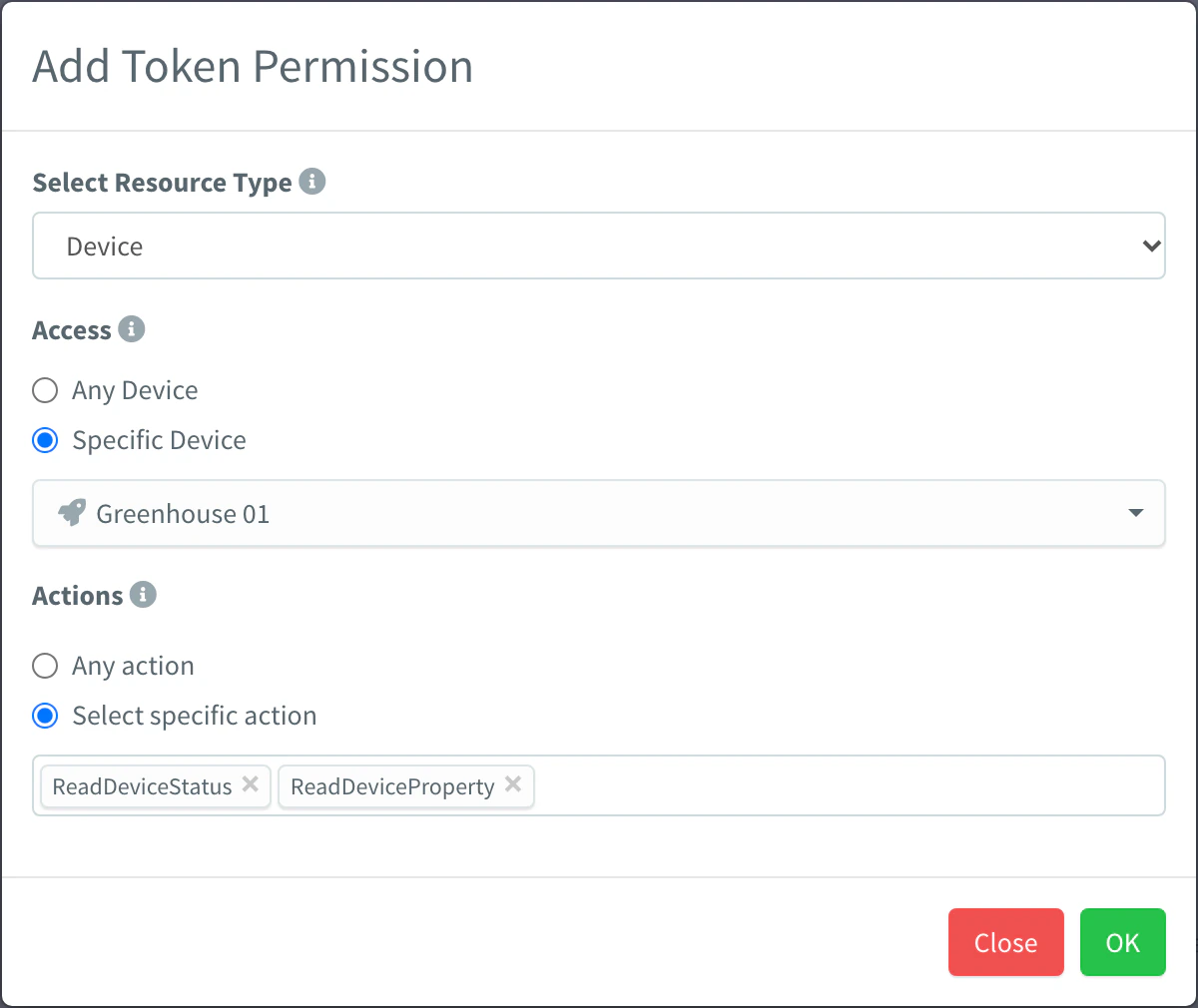
In Allow, click Add for each permission the token needs. In the dialog, choose the resource type in Select Resource Type, any resource or a specific one in Access, and Any action or specific ones in Actions. Add denied permissions the same way in Deny. Click Add Token.
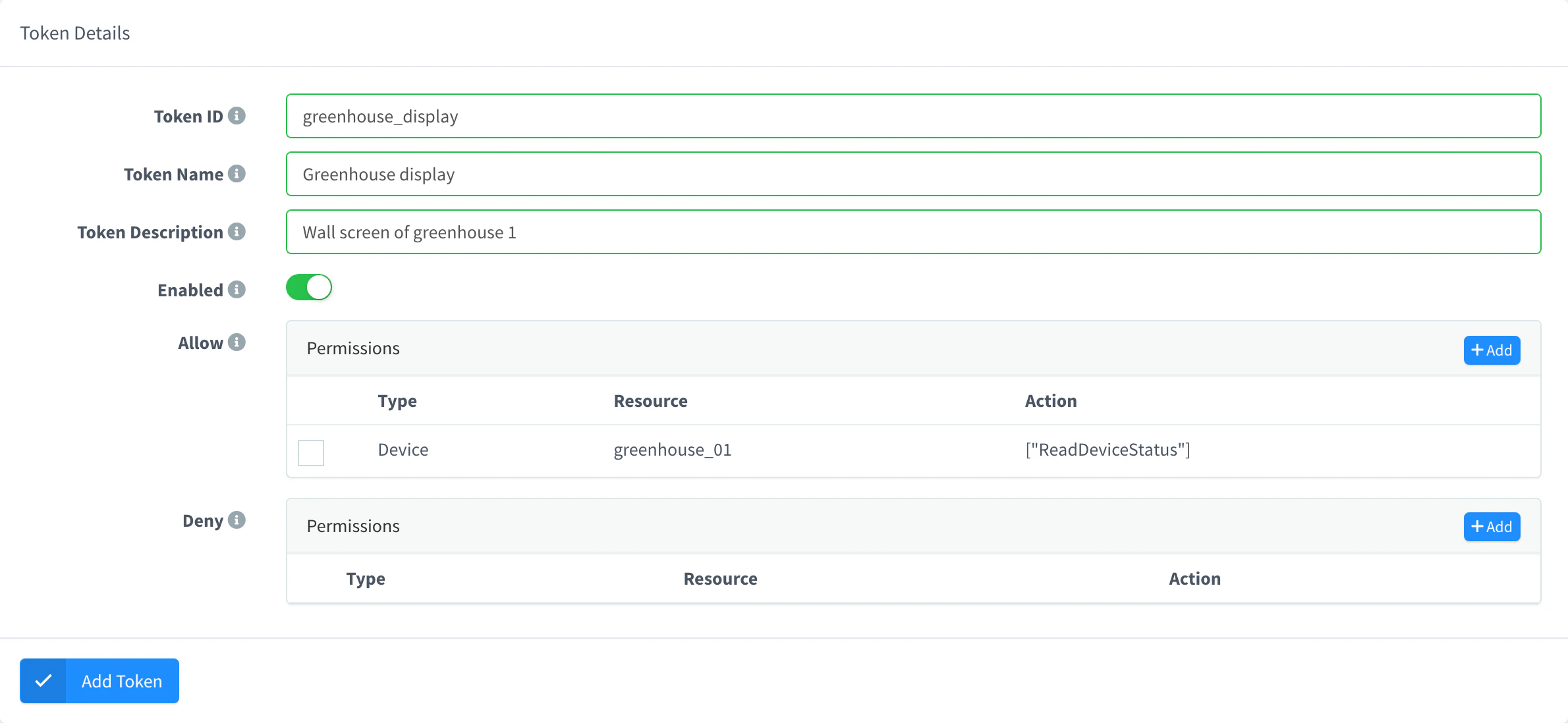
Add Token with one permission Copy the token
The token opens on its Settings tab. Copy the Access Token value and use it in the
Authorization: Bearerheader of your calls.
API
curl -X POST "https://YOUR_SERVER/v1/users/YOUR_USER/tokens" \
  -H "Authorization: Bearer YOUR_TOKEN" \
  -H "Content-Type: application/json" \
  -d '{
    "token": "greenhouse_read",
    "name": "Greenhouse read-only",
    "enabled": true,
    "allow": { "Bucket": { "greenhouse_climate": ["ReadBucket"] } },
    "expire": 1794845199818
  }'
Here YOUR_TOKEN is a token of yours that can create tokens. The response includes access_token, the value the new token uses in the Authorization header. GET /v1/users/{user}/tokens/{token} returns it again; the token list does not.
CLI
The CLI does not manage access tokens. When you sign in with username and password, thinger login creates the token the CLI itself uses (thinger_cli), and thinger logout revokes it. See the CLI reference.
AI
Create an access token that can only read the greenhouse_climate bucket and that expires in 30 days.
The agent uses thinger_resource_create with the token type. See MCP tools.
Change the permissions of a token
You can change the permissions of a token at any time; its value does not change, and its next calls get the new permissions.
Console
Go to Access Tokens and open the token. In Allow or Deny, click Add to add a permission, click the type or the resource of a permission to edit it and click OK, or select permissions and click Remove. Click Update Token to save.
API
curl -X PUT "https://YOUR_SERVER/v1/users/YOUR_USER/tokens/greenhouse_read" \
  -H "Authorization: Bearer YOUR_TOKEN" \
  -H "Content-Type: application/json" \
  -d '{
    "allow": {
      "Bucket": { "greenhouse_climate": ["ReadBucket"] },
      "Device": { "greenhouse_01": ["ReadDeviceStatus"] }
    }
  }'
allow and deny are replaced as a whole: send every permission the token keeps.
AI
Let the greenhouse_read access token also read the status of the device greenhouse_01.
The agent uses thinger_resource_update with the token type.
Clone a token
A clone is a new token with the permissions of an existing one, under a new ID and with its own value. Use it to hand out the same access to several apps, each with a token you can revoke on its own.
Console
Go to Access Tokens, select the token, open the context menu and choose Clone. In Clone Resource, set the Identifier of the copy and, optionally, a Name, a Description and Enabled, and confirm.
API
curl -X POST "https://YOUR_SERVER/v1/users/YOUR_USER/tokens/greenhouse_read/clone" \
  -H "Authorization: Bearer YOUR_TOKEN" \
  -H "Content-Type: application/json" \
  -d '{ "token": "greenhouse_read_app2", "name": "Greenhouse read-only, app 2" }'
AI
Clone the greenhouse_read access token as greenhouse_read_app2.
The agent uses thinger_resource_clone with the token type.
Set an expiration
expire is the moment the token stops working, as a unix timestamp in milliseconds:
- It must be in the future when you create the token; otherwise the call fails with
400 Bad Request(expire must be a future unix timestamp in milliseconds). - It cannot be changed after the token is created: an update with a different
expirefails withexpire cannot be changed: create a new token. To extend access, create a new token and delete the old one. - Once it passes, every call with the token is refused, and the platform deletes the token shortly after.
- Without
expire, the token does not expire. - Tokens created on earlier server versions that already had an
expirevalue show it, but do not expire. Delete them or replace them with new tokens if you relied on that date.
Revoke a token
Disable a token to stop it temporarily, or delete it to revoke it for good. Calls made with it are refused from that moment.
Console
Go to Access Tokens, open the token and turn off Enabled to disable it. To delete it, select it in the list and click Remove.
API
curl -X DELETE "https://YOUR_SERVER/v1/users/YOUR_USER/tokens/greenhouse_read" \
  -H "Authorization: Bearer YOUR_TOKEN"
To disable it instead, send {"enabled": false} with PUT /v1/users/{user}/tokens/{token}.
CLI
The CLI does not manage access tokens other than its own (thinger logout).
AI
Delete the greenhouse_read access token.
Limits
- Anyone with the token value can use its permissions: store it like a password and never put it in client code that others can read.
- A token created inside a project only works with the resources of that project, also for real-time events.
- Device credentials are not access tokens: they authenticate a device connection. See Devices.