

An endpoint is an outgoing action configured once and called many times: send an email, make an HTTP request to a webhook or a REST API, or use a template for services such as Telegram or IFTTT. Devices, alarms, product flows and the REST API call it with a JSON payload, and the endpoint uses that payload in its message.
When to use it
- To send an email or a message when a device reports something.
- To forward device data to your own backend or a third-party service.
- To notify someone when an alarm activates.
- To call a device of another account.
Endpoint types
| Type | type | What it does |
|---|---|---|
email | Sends an email with a subject and a body: the call data as JSON, or your own text or HTML. | |
| HTTP Request | http_request | Makes a request with a method, a URL, headers and a body. See HTTP request bodies. |
| Template | the template ID | A ready-made integration configured with a few parameters, such as Telegram Send Message. See Templates. |
| Virtual | virtual | Does nothing; useful to test calls and flows. |
Placeholders
Placeholders take values from the payload of each call. Write them between double braces:
| Placeholder | Becomes |
|---|---|
{{temperature}} | The temperature field of the payload. |
{{location.lat}} | A nested field: lat inside the location object. |
{{}} | The whole payload as JSON: 23.5 for a number, "open" (with quotes) for a text, or the full object. |
{{temperature=0}} | The temperature field. Endpoints ignore the text after =: it is not used as a default. |
They work in these settings:
| Endpoint | Settings that accept placeholders |
|---|---|
| Destination Addresses, Reply To, Subject and the custom Email body. | |
| HTTP Request | Request URL, the keys and values of Request Headers, and the custom Request Body. |
| Template | The parameters of the template. |
A field that is not in the payload becomes null, also with {{field=value}}: send every field the message uses. When a call has no payload at all, the email and the headers and custom body of a request keep the placeholders as written, and the URL gets null in their place.
Send an email with device data
This email endpoint, greenhouse_report, reports the temperature and humidity that the device sends:
| Setting | Value |
|---|---|
| Destination Addresses | ops@example.com (separate several addresses with commas) |
| Subject | Greenhouse report |
| Email body | Send custom body: The greenhouse is at {{temperature}} °C and {{humidity}} % humidity. |
The device sends a pson with the two fields, for example from a DHT sensor:
pson data;
data["temperature"] = dht.readTemperature();
data["humidity"] = dht.readHumidity();
thing.call_endpoint("greenhouse_report", data);
To send a single value, write {{}} in the body, such as Temperature is {{}} °C, and call the endpoint with a pson that holds only that value:
pson data = dht.readTemperature();
thing.call_endpoint("greenhouse_report", data);
With Resend call data (JSON) as the Email body, the email contains the payload as JSON instead. See Call an endpoint for the other ways a sketch calls endpoints.
HTTP request bodies
The Request Body of an HTTP request sets what it sends with POST, PUT, PATCH and DELETE. GET requests send no body.
| Request Body | body_type | What the request sends |
|---|---|---|
| No data | none | No body. |
| Resend call data (JSON) | json | The payload of the call as JSON. A call with a null payload is skipped and fails with endpoint data is null. |
| Send custom body | custom | Your text with placeholders: JSON, XML, form data. Without a Content-Type header, it is sent as text/plain. |
| Send function return | function | What the JavaScript function endpointPayload(payload) returns. |
A function body transforms the payload before sending it. A string is sent as is; any other value is sent as JSON. A function that returns null skips the call.
function endpointPayload(payload) {
  return {
    device: payload.device,
    celsius: payload.temperature,
    fahrenheit: payload.temperature * 9 / 5 + 32
  };
}
Send function return needs the scripting engine of the server: on an instance without it, saving the endpoint fails with Node.js scripting engine is not enabled on this server.
Templates
Templates are integrations that the platform describes for you: you fill in a few parameters instead of a full request. GET /v1/endpoints/templates lists them:
| Template | ID | Parameters | What it sends |
|---|---|---|---|
| Telegram Send Message | telegram_send_message | Bot Token, Chat Identifier, Chat Message | A text message to a Telegram chat. |
| IFTTT Webhook Trigger | ifttt_maker_trigger | Maker event name, Maker channel secret key | The payload as JSON to an IFTTT webhook event. |
| Thinger.io Device Call | thinger_device_call | Device Owner Username, Device Identifier, Resource Name, Device Access Token | The payload to a device resource of another account. See Call a device of another account. |
| Keen IO Analytics | keen_io_event | Project ID, Event Collection, Write Key | The payload as JSON to a Keen event collection. |
| Initial State Event | initial_state_event | Access Key, Bucket Key | The payload as JSON to an Initial State bucket. |
The parameters are required. Each one can hold a fixed value or placeholders of the call: a parameter set to {{message}} takes the message field of each call, and Greenhouse at {{temperature}} °C builds the text from the payload.
Send a Telegram message
Create a bot
In Telegram, talk to @BotFather, send
/newbotand follow the questions. BotFather answers with the token of the bot.Get the chat identifier
Send any message to your bot, or add it to a group. Then open
https://api.telegram.org/bot<bot token>/getUpdatesin a browser: thechat.idfield of the message is the chat identifier. Group IDs are negative numbers.Create the endpoint
Create an endpoint with the Telegram Send Message type. Set Bot Token and Chat Identifier, and set Chat Message to the text, such as
Greenhouse at {{temperature}} °C, or to{{message}}to send the text from the device.Call it
Call the endpoint from the device with the fields the message uses:
cpppson data; data["temperature"] = dht.readTemperature(); thing.call_endpoint("telegram_alert", data);
The message travels in the URL of the request to Telegram, so keep it short. In the API, a template endpoint has the ID of the template as its type, and config holds the template and its parameters:
{
  "endpoint": "telegram_alert",
  "name": "Telegram alert",
  "enabled": true,
  "type": "telegram_send_message",
  "config": {
    "template": "telegram_send_message",
    "parameters": {
      "token": "YOUR_BOT_TOKEN",
      "chat": "YOUR_CHAT_ID",
      "message": "Greenhouse at {{temperature}} °C"
    }
  }
}
Call a device of another account
A device calls a device of its own account with thing.call_device(). To call a device of another account, create an endpoint in the account of the caller that calls the device resource of the other account, and give it a token of the other account that allows that call: a device token or an access token.
- On any server: an HTTP Request endpoint with the
POSTmethod, the URLhttps://YOUR_SERVER/v3/users/{user}/devices/{device}/resources/{resource}with the username, device ID and device resource of the other account, a headerAuthorizationwith the valueBearerfollowed by the token, and Resend call data (JSON) as the body. - On the free Cloud server: the Thinger.io Device Call template does the same with four parameters. It always calls the Cloud server, so it does not work between accounts of a private instance.
The device calls the endpoint as any other:
pson data;
data["on"] = true;
thing.call_endpoint("neighbor_lamp", data);
Create an endpoint
YOUR_SERVER is iot.thinger.io on the free Cloud account, or the domain of your private instance.
Console
Open Endpoints
Go to Endpoints and click Add Endpoint (or Create an Endpoint if you have none yet).
Choose the type
Set the Endpoint Identifier, the Endpoint Name and an optional Endpoint Description, and choose the Endpoint Type: Email, HTTP Request, Virtual or one of the templates.
Configure it
Fill in the settings of the type. An email needs the Destination Addresses, an optional Reply To, the Subject and the Email body. An HTTP request needs the method and the Request URL, optional Request Headers, and a Request Body. A template needs its parameters. Click Add Endpoint.
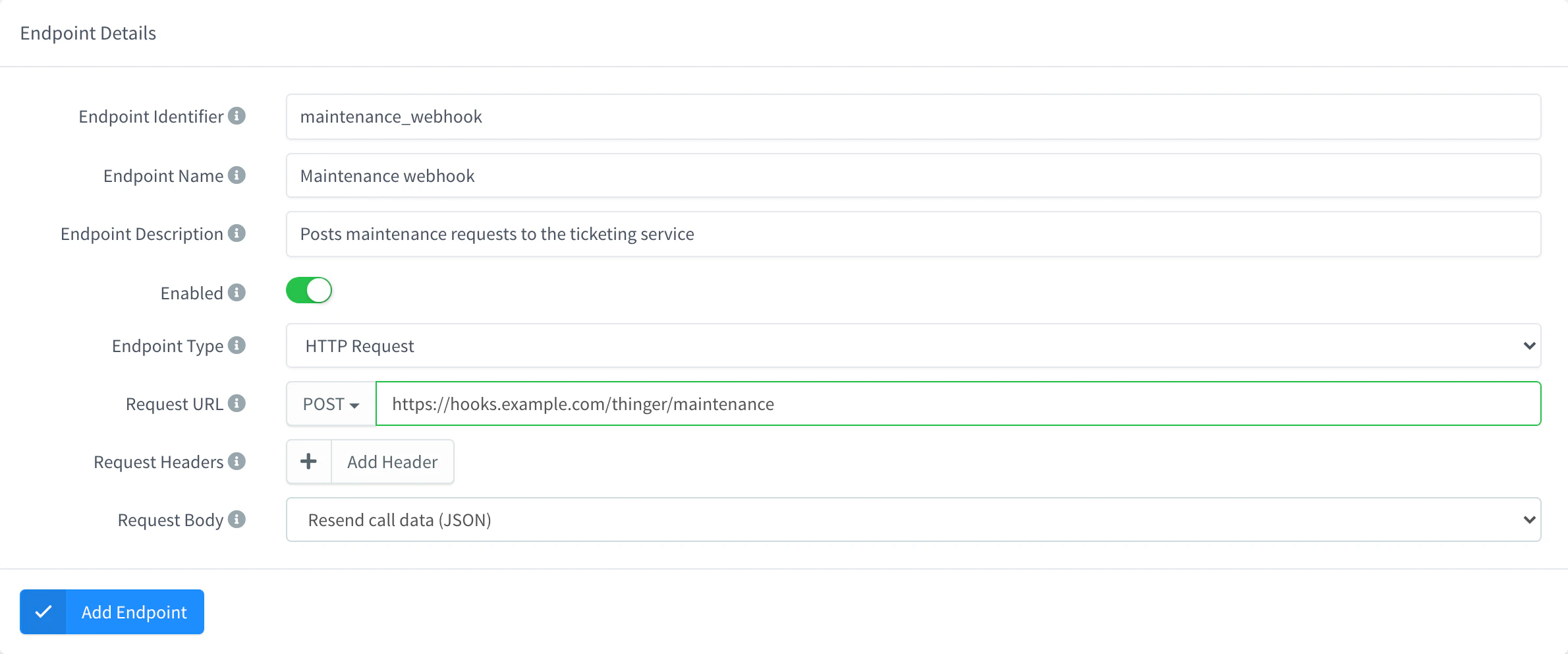
Add an HTTP Request endpoint
API
curl -X POST "https://YOUR_SERVER/v1/users/YOUR_USER/endpoints" \
  -H "Authorization: Bearer YOUR_TOKEN" \
  -H "Content-Type: application/json" \
  -d '{
    "endpoint": "ops_webhook",
    "name": "Operations webhook",
    "enabled": true,
    "type": "http_request",
    "config": {
      "method": "POST",
      "url": "https://example.com/hooks/thinger",
      "body_type": "json",
      "headers": [],
      "body": ""
    }
  }'
YOUR_TOKEN is an access token with permission to create endpoints. An email endpoint has type email and a config with recipient, subject, body_type (json or html for a custom body), body and an optional reply_to. The REST API reference has examples for each type.
CLI
The CLI does not manage endpoints. Use the console, the API or an agent.
AI
Create an endpoint called ops_webhook that sends a POST request with the call data as JSON to https://example.com/hooks/thinger.
The agent uses thinger_resource_create with the endpoint type. See MCP tools.
Call an endpoint
A call sends a JSON payload to the endpoint and returns what the endpoint answered. Devices call endpoints with call_endpoint in the Arduino library; alarms, product flows and Data Bucket exports call them on their own.
Console
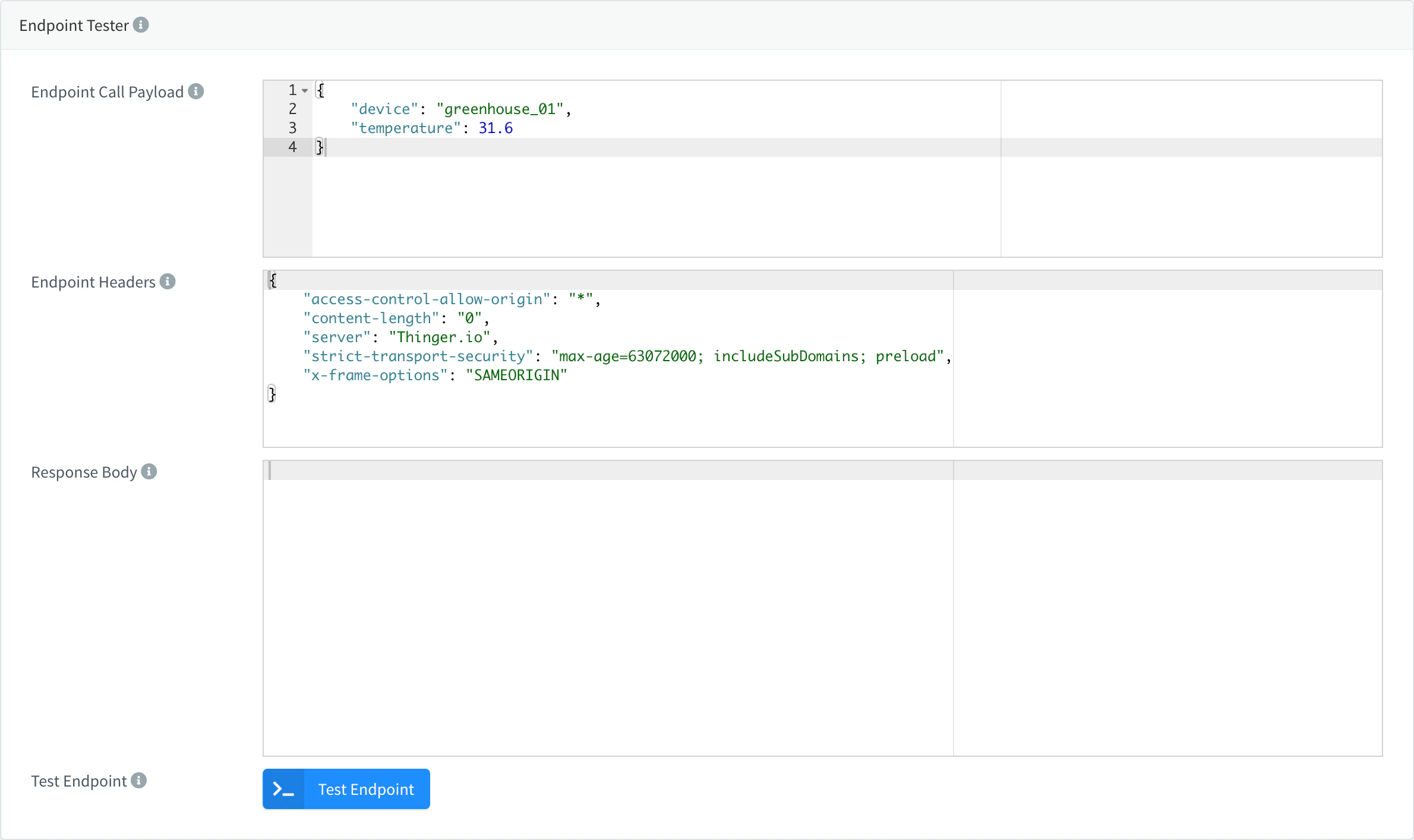
Open the endpoint in Endpoints and go to the Test tab. Write a JSON payload in Endpoint Call Payload and click Test Endpoint; the Response Body shows what the destination answered.
API
curl -X POST "https://YOUR_SERVER/v1/users/YOUR_USER/endpoints/ops_webhook/call" \
  -H "Authorization: Bearer YOUR_TOKEN" \
  -H "Content-Type: application/json" \
  -d '{ "device": "YOUR_DEVICE", "temperature": 31.2 }'
CLI
The CLI cannot call endpoints. Use the API or an agent.
AI
Call my ops_webhook endpoint with a test payload where temperature is 31.2 and tell me what it answered.
The agent uses thinger_resource_call with the call action.
Limits
- An endpoint call fails if the destination does not answer or answers with an error; the response of the call tells you why.
- A disabled endpoint refuses calls with
endpoint is disabled. - Every call emits the
endpoint_callandendpoint_call_responseevents, which you can use to monitor integrations. - Your account can have a minimum interval between calls to an endpoint; a call that comes too soon fails with
rate limit reached. Plan limits apply to the use of endpoints: see Plans and limits.