

The Product Script card of a product profile holds the JavaScript functions that the rest of the profile calls: to compute a device resource, to transform a payload or to find the device of a message. The code runs on the platform, once per product, and you follow what it logs in the script console.
When to use it
- To compute the device resources of virtual devices or to simulate data.
- To convert payloads, such as a binary frame or a value in another unit, before they reach a property, a bucket or a flow.
- To find the device ID in the messages of a gateway or an external system (a Device Identifier Resolver).
Where the profile calls your functions
| Where | Setting | The function receives | It returns |
|---|---|---|---|
| A request or flow target | Product Function | The payload of the call | The result of the resource |
| An API resource response | Product Function | The user, device, resource and product of the call | The response |
| Any source, target or response | Payload Processing | The payload | The new payload; an empty result skips the write |
| An API resource or flow | Device Identifier Resolver | The payload | The device ID |
| A template | {{<placeholder>:<function>}} | The value of the placeholder | Its replacement |
Choose Source Event as the payload to receive the whole context, with the device ID:
// event = { user, device, resource, product, payload }
function status(event) {
  console.log('status called for', event.device);
  return { device: event.device, ok: true };
}

function resolveDevice(payload) {
  // device ID from the serial number sent by the caller
  return 'meter_' + payload.serial;
}
Functions are found by name: declare them with function name() {} at the top level. They run synchronously: promises, async functions, timers and network requests do not complete. To call an external service, use an Endpoint Call target. Return JSON values (objects, arrays, numbers, strings, booleans); a function that throws returns null.
Write the script
YOUR_SERVER is iot.thinger.io on the free Cloud account, or the domain of your private instance. YOUR_PRODUCT is the product ID.
Console
Open the Product Script card
Open the product on its Profile tab and scroll to the Product Script card.
Write the code
Leave the storage empty to write the code in the editor. Add Function inserts the skeleton of a function that processes a payload.
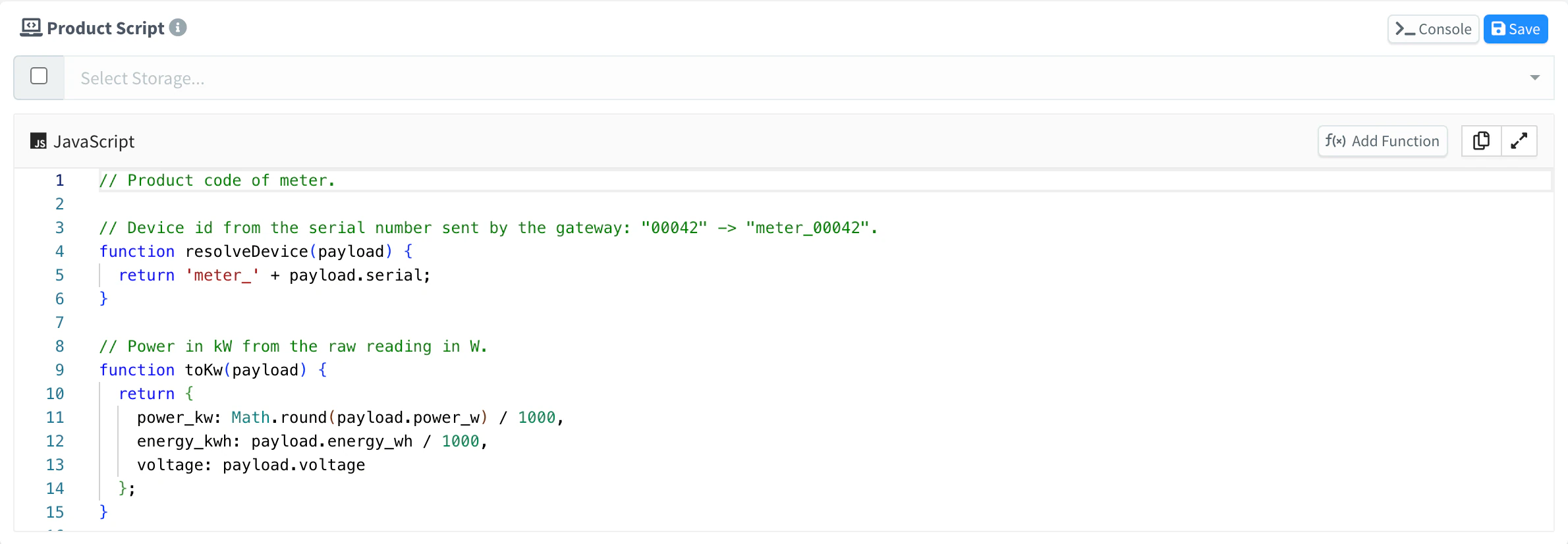
Product Script card Save it
Click Save. The new code takes effect at once.
API
curl -X PUT "https://YOUR_SERVER/v1/users/YOUR_USER/products/YOUR_PRODUCT/profile/code" \
  -H "Authorization: Bearer YOUR_TOKEN" \
  -H "Content-Type: application/json" \
  -d '{"code": "function resolveDevice(payload) {\n  return \"meter_\" + payload.serial;\n}\n"}'
GET on the same path returns the current code.
CLI
The CLI cannot edit the script. Include it in the profile.code of the document you pass to thinger product create YOUR_PRODUCT --from product.json.
AI
Add a function to the script of the product YOUR_PRODUCT that converts the temperature_f field of a payload to Celsius, and use it in the telemetry bucket.
The agent uses thinger_resource_update with the product_profile_code type, and can read the guide on product code with thinger_doc_read. See MCP tools.
Load the script from a File Storage
Instead of inline code, the product can run the index.js file of a File Storage, with the modules of its node_modules folder. With a folder (profile.code.path), it runs <folder>/index.js, so one storage can hold a whole application: for example, the dashboard app in app/ and the code of each product in code/<product>/. When a storage is set, the inline code is not used.
Console
In the Product Script card, choose the storage and click Save. The console sets the storage only: to use a folder of it, set path with the API or an agent.
API
curl -X PUT "https://YOUR_SERVER/v1/users/YOUR_USER/products/YOUR_PRODUCT/profile/code" \
  -H "Authorization: Bearer YOUR_TOKEN" \
  -H "Content-Type: application/json" \
  -d '{"storage": "fleet_app", "path": "code/meter"}'
path is relative to the root of the storage; leave it out to use the root.
CLI
The CLI cannot set the storage of the script. Use the console, the API or an agent.
AI
Make the product YOUR_PRODUCT run the code in the folder code/meter of my fleet_app storage.
Warning
Editing index.js in the storage does not reload the script. Save the Product Script card, or send the PUT again, after you change the files.
Debug with the script console
Click Console in the Product Script card to open the script console. It shows, as they happen, the messages that your functions log with console.log, console.info, console.warn and console.error, each with its time and level:
[console] connected to product script console
17:02:57.418 [log] status called for meter_000005
The console shows only what is logged while it is open. From outside the console, the same messages arrive through a WebSocket on GET /v1/users/{user}/products/{product}/profile/console: see the REST API reference. The CLI and the MCP tools cannot open it.
Limits
- Inline code has no access to the file system. Code loaded from a storage reads only the files of its own storage.
- The
storagemust exist, andpathcannot leave it (..is refused). Apathwithout astorageis refused. - Global variables keep their values between calls, but they are reset whenever the profile is saved. Keep the state that matters in a device property.
- Functions run without a time limit: keep them short.