

A virtual device is a device without hardware. The platform keeps it connected while it is enabled, and its device resources come from its product: each one is computed on the platform, by a function of the product script or by a call to an external service. Dashboards, Data Buckets, alarms, the API and agents use it like any other device.
When to use it
- To build and test dashboards, buckets and alarms before the hardware exists.
- To run demos and training without real devices.
- To expose a device built from other data, such as values combined from several devices or read from an external service: a weather API, a market price, the status of another system.
Use an HTTP device instead when something outside the platform sends the data, and a subdevice when the data arrives through a gateway.
How a virtual device gets its data
A virtual device has the device resources that its product defines in API resources. Each API resource has a request and a response:
- The request does the work. Product Function runs a function of the product script, and Endpoint Call calls an endpoint, such as an HTTP request to an external API. Its payload can include the properties of the device, so each device of the product can ask for its own data.
- The response sets what the device resource returns, optionally passed through a function of the product script (Payload Processing).
Nothing runs on its own: the device resource is computed each time something reads it. To read it at a fixed interval, add a bucket to the product with the Device Resource source and a Sampling Interval (see Product buckets). The product script cannot do this for you: its functions run only when called, and cannot make network requests or start timers.
The rest of this page builds a complete example: a weather station that reads the current weather of Madrid from the public Open-Meteo API every 15 minutes, stores it in a Data Bucket and shows it on a dashboard.
Build a weather station
The example uses these IDs: the endpoint open_meteo, the product weather_station with its API resource and bucket weather, and the virtual device madrid_weather. Open-Meteo needs no API key.
YOUR_SERVER is iot.thinger.io on the free Cloud account, or the domain of your private instance. YOUR_TOKEN is an access token of your account with permission to create the resources of each step.
Create the endpoint
The endpoint sends the request to Open-Meteo. Its URL takes the latitude and longitude from the payload of each call.
Console
Open the form
Go to Endpoints and click Add Endpoint. Set the Endpoint Identifier to
open_meteoand the Endpoint Name toOpen-Meteo current weather, and choose HTTP Request as Endpoint Type.Set the request
Choose the
GETmethod and set the Request URL:texthttps://api.open-meteo.com/v1/forecast?latitude={{lat}}&longitude={{lng}}¤t=temperature_2m,relative_humidity_2m,wind_speed_10mClick Add Endpoint.
Test it
Open the endpoint, go to the Test tab, write
{"lat": 40.4168, "lng": -3.7038}in Endpoint Call Payload and click Test Endpoint. The Response Body shows the current weather in Madrid.
API
curl -X POST "https://YOUR_SERVER/v1/users/YOUR_USER/endpoints" \
-H "Authorization: Bearer YOUR_TOKEN" \
-H "Content-Type: application/json" \
-d '{
"endpoint": "open_meteo",
"name": "Open-Meteo current weather",
"enabled": true,
"type": "http_request",
"config": {
"method": "GET",
"url": "https://api.open-meteo.com/v1/forecast?latitude={{lat}}&longitude={{lng}}¤t=temperature_2m,relative_humidity_2m,wind_speed_10m",
"body_type": "json",
"headers": []
}
}'CLI
The CLI does not manage endpoints. Use the console, the API or an agent.
AI
Create an endpoint called open_meteo that sends a GET request to the Open-Meteo forecast API for the current temperature, relative humidity and wind speed, taking the latitude and longitude from the lat and lng fields of each call.
The agent uses thinger_resource_create with the endpoint type. See MCP tools.
Open-Meteo answers with a JSON document. The values the example keeps are in current:
{
  "latitude": 40.417583,
  "longitude": -3.739399,
  "current_units": {
    "time": "iso8601",
    "interval": "seconds",
    "temperature_2m": "°C",
    "relative_humidity_2m": "%",
    "wind_speed_10m": "km/h"
  },
  "current": {
    "time": "2026-10-18T08:15",
    "interval": 900,
    "temperature_2m": 11.6,
    "relative_humidity_2m": 72,
    "wind_speed_10m": 16.3
  }
}
Create the product
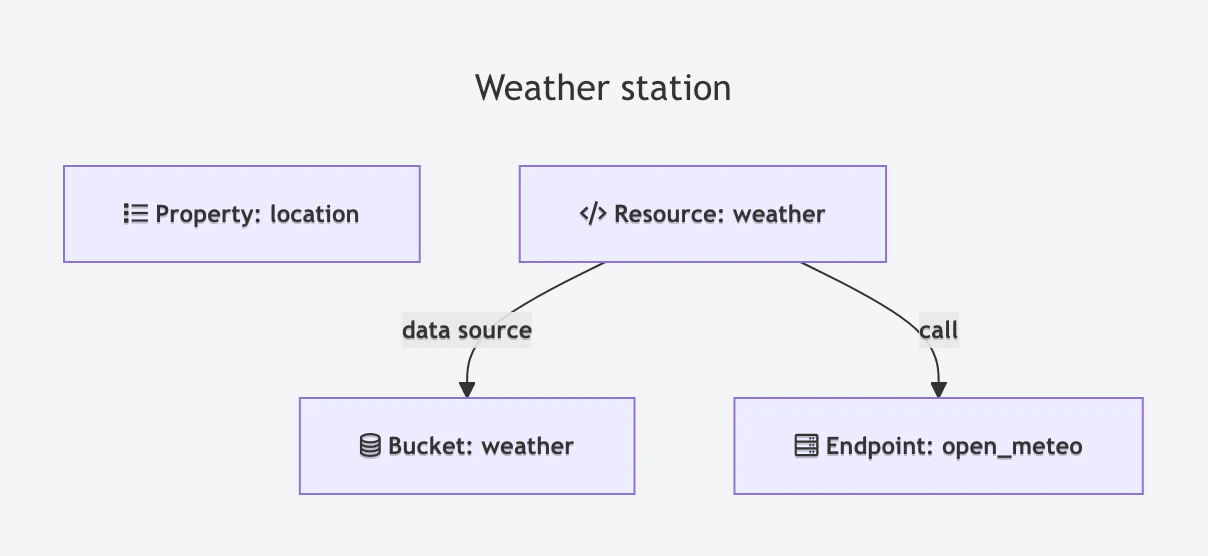
The product holds everything its devices share: the weather API resource, which calls the endpoint with the location of the device; the parseWeather function, which keeps the three values; and the weather bucket, which reads the resource every 15 minutes.
function parseWeather(response) {
  if (!response || !response.current) return null;
  return {
    temperature: response.current.temperature_2m,
    humidity: response.current.relative_humidity_2m,
    wind_speed: response.current.wind_speed_10m
  };
}
The function returns null when the answer has no current values, for example when Open-Meteo answers with an error, and the bucket skips that reading.
Console
Create the product
Go to Products and click Add Product. Set the Product ID to
weather_stationand the Product Name toWeather station, and click Add Product. The product opens on its Profile tab.Write the script
In the Product Script card, write the
parseWeatherfunction and click Save.Add the API resource
Click Add in the API Resources card and set the Resource Identifier to
weather. On Request, choose Endpoint Call, set the Endpoint toopen_meteoand choose Template Payload with this template:json{"lat": {{property.location.lat}}, "lng": {{property.location.lng}}}On Response, choose Request Response, Source Payload and the Payload Processing function
parseWeather. Click Save.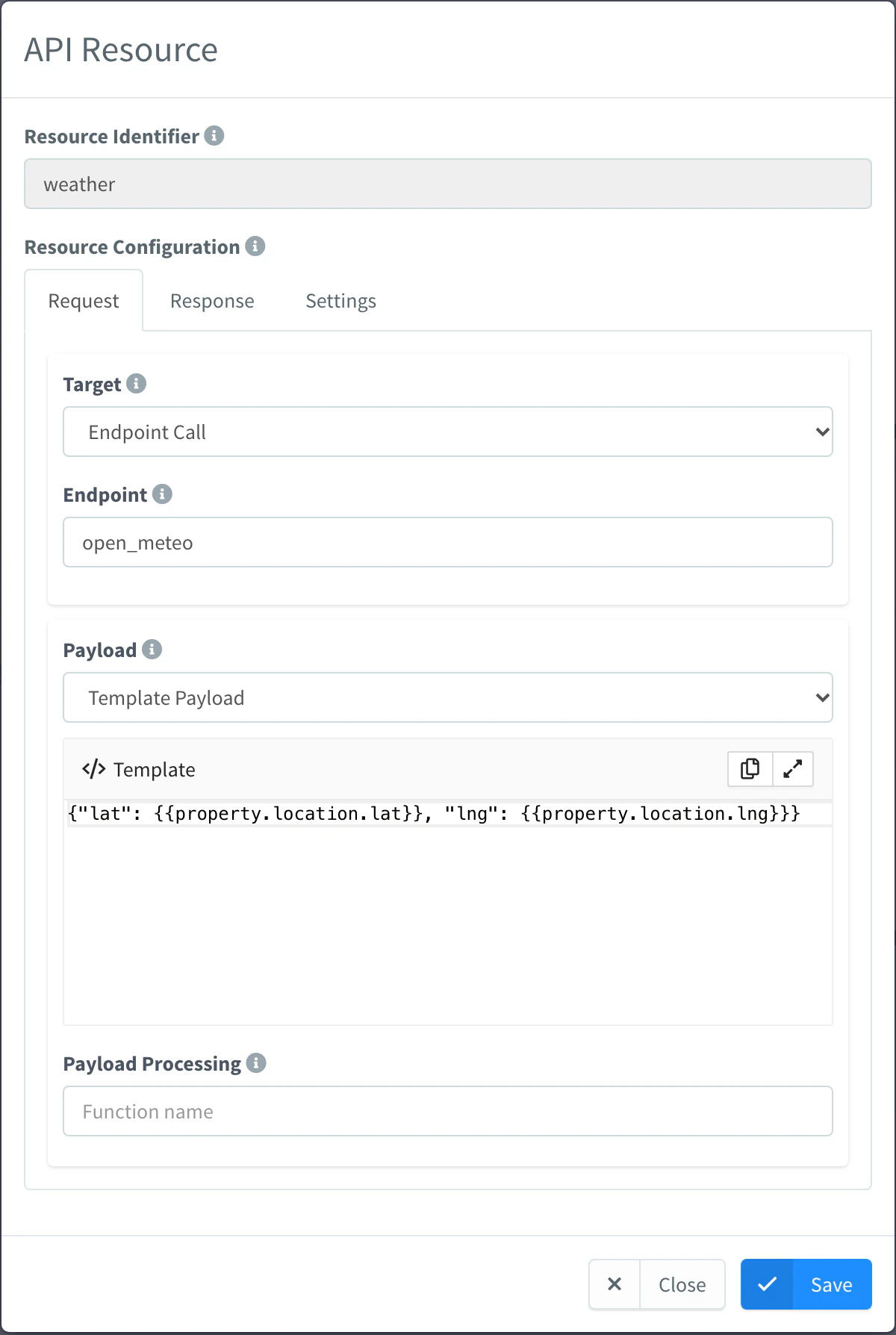
API resource that calls the endpoint Add the bucket
Click Add in the Buckets card and set the Bucket Identifier to
weather. On Bucket Source, choose Device Resource, the Resource Nameweatherand a Sampling Interval of 15 minutes, with Source Payload. On Settings, set the Bucket Name and click Save.
The Profile Graph of the product shows how the pieces connect:
API
Save the product as weather_station.json. The code is the product script as a JSON string:
{
  "product": "weather_station",
  "name": "Weather station",
  "description": "Virtual weather stations that read the Open-Meteo API at their location",
  "enabled": true,
  "profile": {
    "api": {
      "weather": {
        "name": "Weather",
        "description": "Current temperature, humidity and wind speed at the device location",
        "enabled": true,
        "request": {
          "data": {
            "target": "endpoint_call",
            "endpoint": "open_meteo",
            "payload": "{\"lat\": {{property.location.lat}}, \"lng\": {{property.location.lng}}}"
          }
        },
        "response": {
          "data": {
            "source": "request_response",
            "payload_type": "source_payload",
            "payload_function": "parseWeather"
          }
        }
      }
    },
    "buckets": {
      "weather": {
        "name": "Weather",
        "description": "Weather readings every 15 minutes",
        "enabled": true,
        "data": {
          "source": "resource",
          "resource": "weather",
          "update": "interval",
          "interval": 15,
          "magnitude": "minute",
          "payload_type": "source_payload"
        },
        "retention": { "period": 6, "unit": "months" }
      }
    },
    "code": {
      "code": "function parseWeather(response) {\n  if (!response || !response.current) return null;\n  return {\n    temperature: response.current.temperature_2m,\n    humidity: response.current.relative_humidity_2m,\n    wind_speed: response.current.wind_speed_10m\n  };\n}\n"
    }
  }
}
Then create the product with it:
curl -X POST "https://YOUR_SERVER/v1/users/YOUR_USER/products" \
  -H "Authorization: Bearer YOUR_TOKEN" \
  -H "Content-Type: application/json" \
  -d @weather_station.json
CLI
Save the product document of the API tab as weather_station.json and create the product from it:
thinger product create weather_station --from weather_station.jsonAI
Create a product called weather_station. Give it an API resource called weather that calls my open_meteo endpoint with the lat and lng of the location property of the device, and passes the answer through a product script function parseWeather that keeps current.temperature_2m, current.relative_humidity_2m and current.wind_speed_10m as temperature, humidity and wind_speed. Add a bucket called weather that reads the weather resource of each device every 15 minutes.
The agent uses thinger_resource_create with the product, product_profile_api and product_profile_bucket types, and thinger_resource_update with product_profile_code. See MCP tools.
The bucket ID has no , so the product writes every station to the same Data Bucket, tagged with the device. The bucket is created on the first reading.
Create the virtual device
Create madrid_weather in the product and give it a location property: the API resource sends its lat and lng to the endpoint, and maps and geofences use it to place the device, which has no network location of its own. Virtual devices have no device credentials.
Console
Open the form
Go to Devices and click Add Device.
Fill in the form
Choose Virtual Device as Device Type and set the Device Id to
madrid_weatherand the Device Name toMadrid weather. Choose the productWeather stationin Product and click Add Device.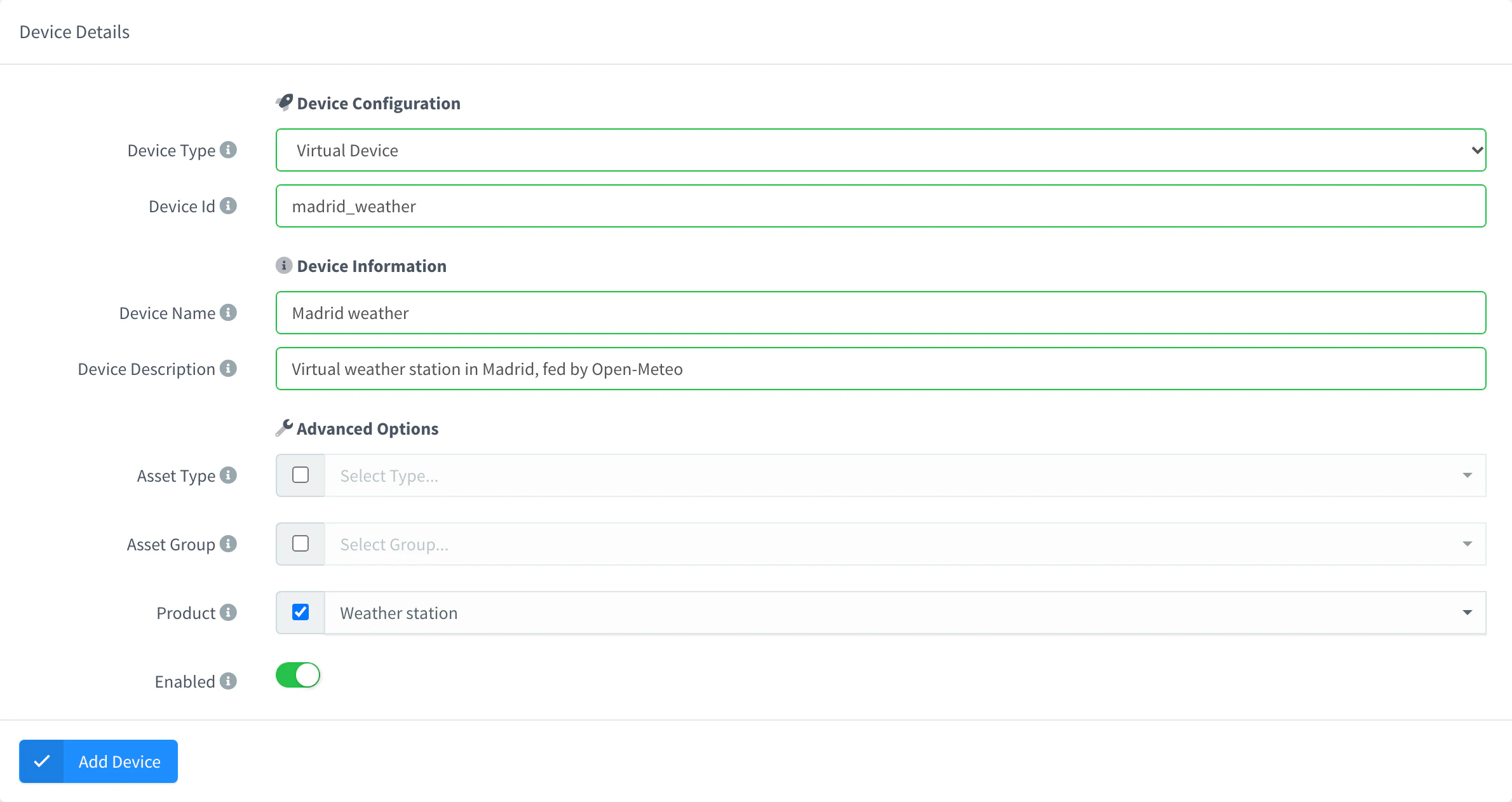
Add a Virtual device of a product Set the location
Open the device, go to Properties and add a property with the ID
locationand the value{"lat": 40.4168, "lng": -3.7038}.
API
curl -X POST "https://YOUR_SERVER/v1/users/YOUR_USER/devices" \
  -H "Authorization: Bearer YOUR_TOKEN" \
  -H "Content-Type: application/json" \
  -d '{"device": "madrid_weather", "type": "Virtual", "name": "Madrid weather", "product": "weather_station"}'
Leave product out to assign the product later. Then set the location:
curl -X POST "https://YOUR_SERVER/v3/users/YOUR_USER/devices/madrid_weather/properties" \
  -H "Authorization: Bearer YOUR_TOKEN" \
  -H "Content-Type: application/json" \
  -d '{"property": "location", "value": {"lat": 40.4168, "lng": -3.7038}}'
CLI
thinger device create madrid_weather -t Virtual -n "Madrid weather" -p weather_station
thinger device property-set madrid_weather location '{"lat": 40.4168, "lng": -3.7038}'
AI
Create a virtual device called madrid_weather in the product weather_station, and set its location to latitude 40.4168 and longitude -3.7038.
The device shows as disconnected when it is created; it connects a moment later and stays connected while it is enabled. From then on, the bucket reads its weather every 15 minutes. Another station is one more device with its own location.
Read the weather
Read the device resource to check the chain end to end. Each read calls Open-Meteo.
Console
Open the device and go to API. Click the weather resource to run it and see its output.
API
curl "https://YOUR_SERVER/v3/users/YOUR_USER/devices/madrid_weather/resources/weather" \
  -H "Authorization: Bearer YOUR_TOKEN"
CLI
thinger device resource madrid_weather weatherAI
What is the weather right now at my device madrid_weather?
The agent uses thinger_device_resource_call.
The output is the result of parseWeather:
{"humidity": 72, "temperature": 11.6, "wind_speed": 16.3}Build the dashboard
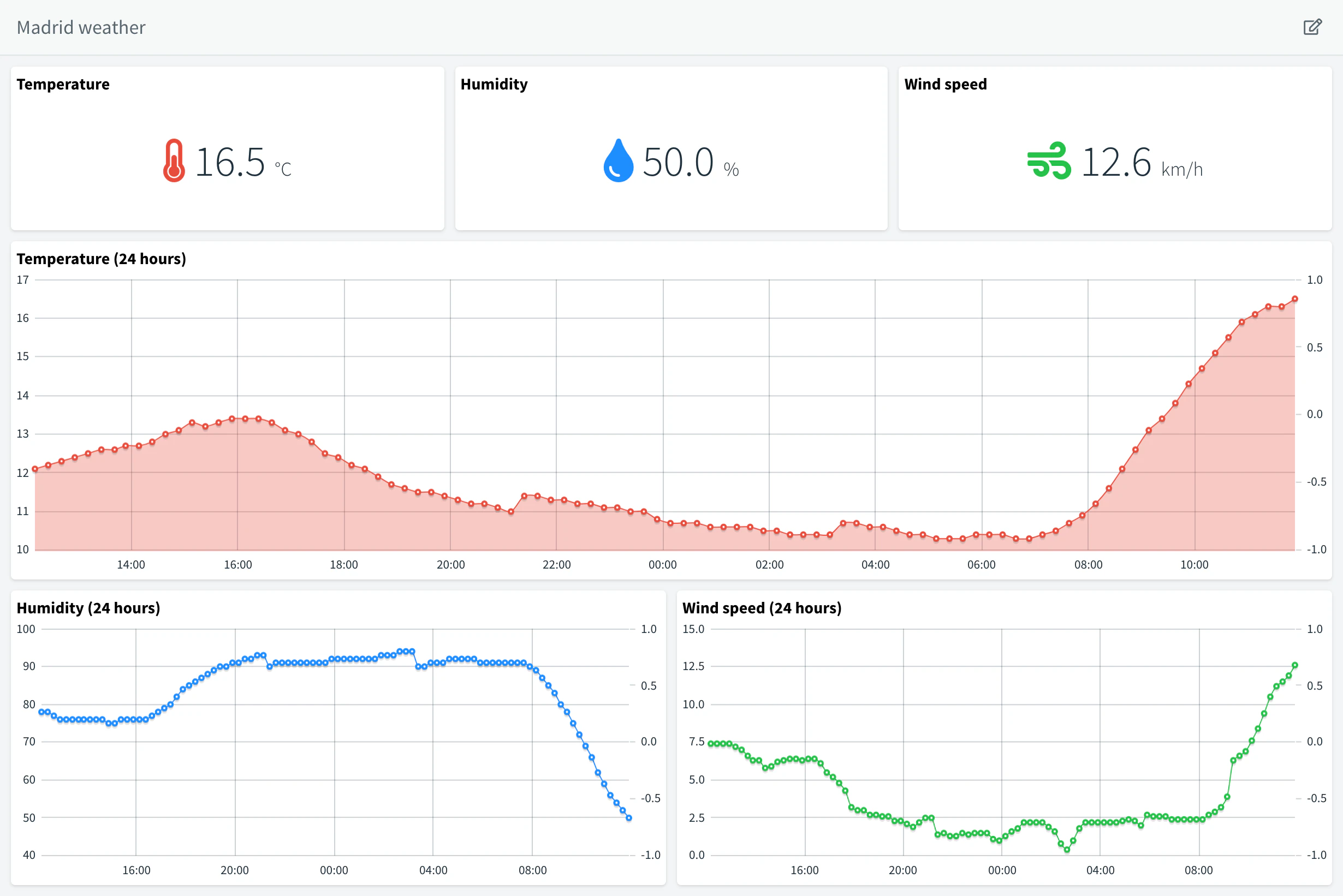
The dashboard shows the latest reading of each value and the last 24 hours of the weather bucket, filtered by the device.
Console
Create the dashboard
Go to Dashboards and click Add Dashboard. Set the Dashboard id to
madrid_weatherand the Dashboard name toMadrid weather, and click Add Dashboard.Add the current values
Turn on the edit mode and click Add Widget. Choose the Text/Value type and the From Data Bucket source, select the
weatherbucket, the devicemadrid_weatherin its device tag and the valuetemperature, and set the unit to°C. Add two more forhumidity(%) andwind_speed(km/h).Add the charts
Add a Time Series Chart with the same source and value, and a Relative Timeframe of the latest 24 hours. Repeat it for the other values, place the widgets and save the dashboard.
API
This call creates the dashboard with the temperature chart. Add the other widgets in the editor, or add them to widgets with the same shape; see Widgets.
curl -X POST "https://YOUR_SERVER/v1/users/YOUR_USER/dashboards" \
  -H "Authorization: Bearer YOUR_TOKEN" \
  -H "Content-Type: application/json" \
  -d '{
    "dashboard": "madrid_weather",
    "name": "Madrid weather",
    "tabs": [{
      "name": "Weather",
      "icon": "fas fa-cloud-sun",
      "widgets": [{
        "type": "chart",
        "layout": { "col": 0, "row": 0, "sizeX": 6, "sizeY": 8 },
        "panel": { "title": "Temperature (24 hours)", "color": "#ffffff", "currentColor": "#ffffff", "showOffline": { "type": "none" } },
        "properties": { "axis": true, "fill": true, "legend": false },
        "sources": [{
          "name": "Temperature",
          "color": "#e74c3c",
          "source": "bucket",
          "timespan": { "mode": "relative", "period": "latest", "value": 24, "magnitude": "hour" },
          "bucket": { "id": "weather", "mapping": "temperature", "tags": { "device": ["madrid_weather"] } }
        }]
      }]
    }]
  }'
AI
Build a dashboard for my device madrid_weather with its current temperature, humidity and wind speed, and charts of the last 24 hours, reading the weather bucket.
Agents build dashboards as dashboard apps with thinger_dashboard_publish, rather than widget layouts. See Build dashboards with AI.
Result
Every 15 minutes the weather bucket gets a new record with the temperature, humidity and wind speed of Madrid, tagged with the device:
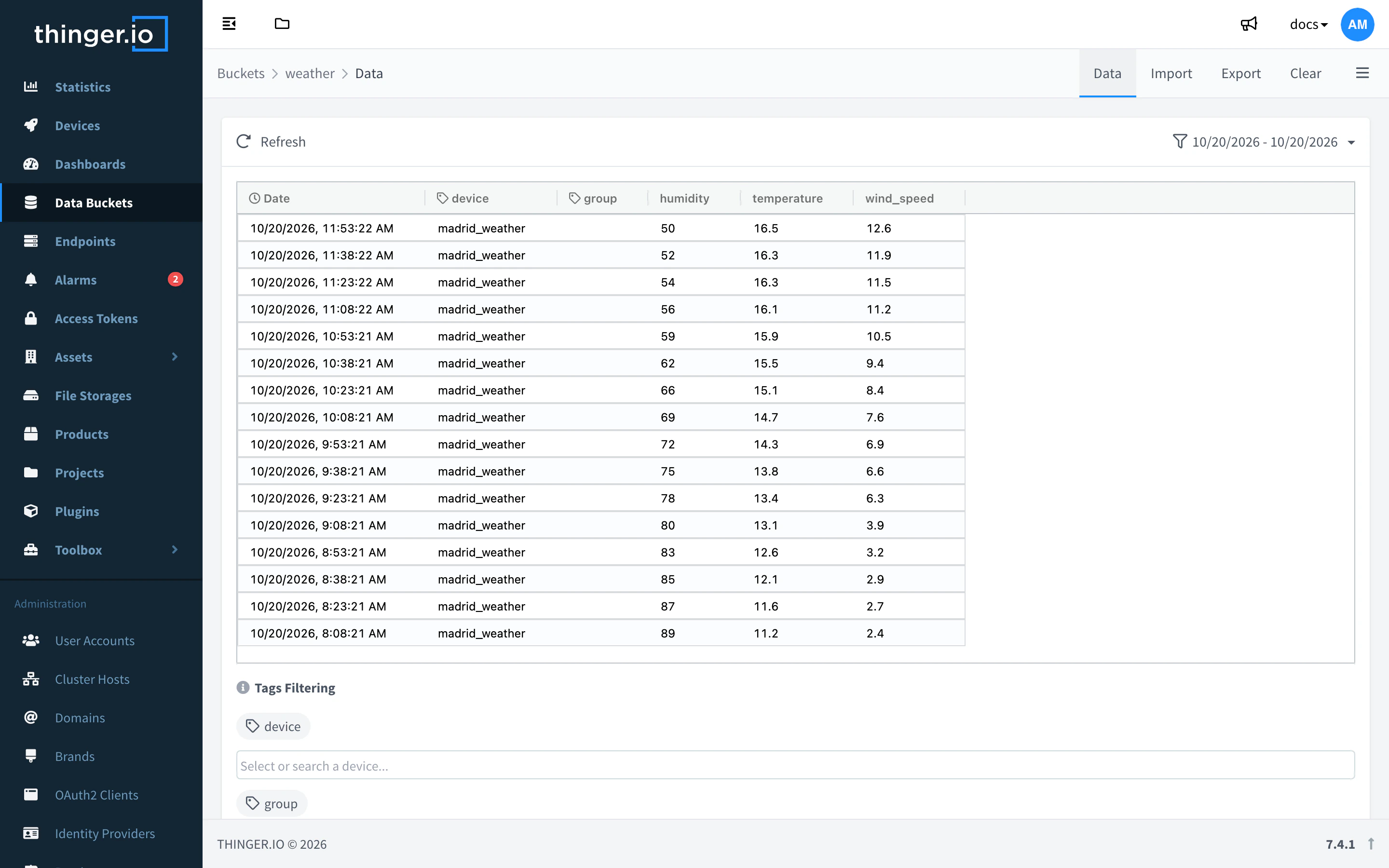
The dashboard shows the current weather and how it changed over the last day:
Read the stored readings of the device from the API, the CLI or an agent:
API
curl "https://YOUR_SERVER/v3/users/YOUR_USER/devices/madrid_weather/buckets/weather/data?items=3" \
  -H "Authorization: Bearer YOUR_TOKEN"
CLI
thinger bucket read weather -d madrid_weather -n 3AI
How did the temperature at madrid_weather change over the last 24 hours? Use the weather bucket.
The agent uses thinger_bucket_data_read with device.
Limits
- A virtual device does nothing on its own: without a product with API resources, it has no device resources, and they are computed only when something reads them.
- The product script cannot make network requests or run on a timer. Call external services with an Endpoint Call, and read the resource at an interval with a bucket, a property or a flow of the product.
- Every reading calls the external service. Keep the interval within what its terms allow: Open-Meteo updates its current values every 15 minutes, and its free API is for non-commercial use.
- It has no Terminal or Explorer: those need a device that runs the Linux client.
- Disable the device to disconnect it; enable it again to reconnect.
- Virtual devices count as devices of your account: see Plans and limits.