

The ESP32 is a microcontroller from Espressif with Wi-Fi and Bluetooth. It is found on many development boards, some with Ethernet, LoRa, audio or a display. The Thinger.io Arduino library connects it over Wi-Fi with ThingerESP32 and over Ethernet with ThingerESP32Eth, always with TLS.
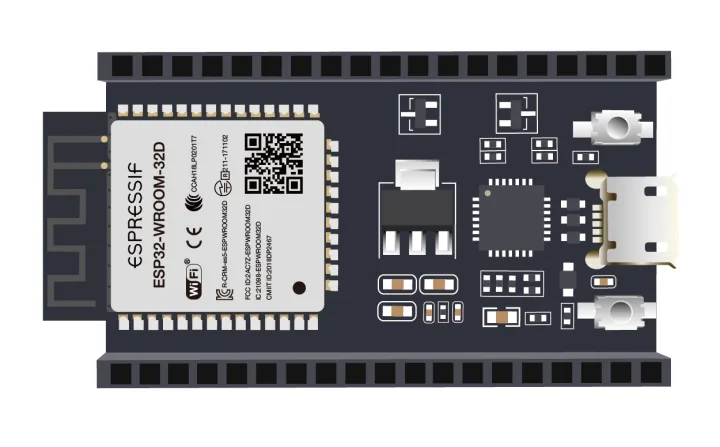
Supported chips
The same sketches work on every chip of the family. In the Arduino IDE, select the board of your chip in Tools > Board > esp32.
| Chip | Network | Class | OTA |
|---|---|---|---|
| ESP32 | Wi-Fi or Ethernet | ThingerESP32, ThingerESP32Eth | Yes, ThingerESP32OTA |
| ESP32-S2 | Wi-Fi | ThingerESP32 | Yes, ThingerESP32OTA |
| ESP32-S3 | Wi-Fi | ThingerESP32 | Yes, ThingerESP32OTA |
| ESP32-C3 | Wi-Fi | ThingerESP32 | Yes, ThingerESP32OTA |
| ESP32-C5 | Wi-Fi, 2.4 and 5 GHz | ThingerESP32 | Yes, ThingerESP32OTA |
| ESP32-C6 | Wi-Fi | ThingerESP32 | Yes, ThingerESP32OTA |
| ESP32-P4 | Ethernet | ThingerESP32Eth | Yes, ThingerESP32OTA |
Boards built on these chips use the same classes, such as the Arduino Nano ESP32 (ESP32-S3) and the Seeed Studio XIAO ESP32 boards. The ESP32-P4 has no Wi-Fi of its own: connect it over Ethernet, as in ESP32 over Ethernet.
Set up the board
Install the board package
In the Arduino IDE, open Tools > Board > Boards Manager, search for
esp32and install esp32 by Espressif Systems. In PlatformIO, useplatform = espressif32.Install the library
Install thinger.io from the Library Manager. See Arduino for PlatformIO.
Create the credentials file
The sketches read the credentials from
arduino_secrets.h, in the sketch folder:arduino_secrets.hcpp#define USERNAME "YOUR_USER" #define DEVICE_ID "YOUR_DEVICE" #define DEVICE_CREDENTIAL "YOUR_TOKEN" #define SSID "wifi-network" #define SSID_PASSWORD "wifi-password"DEVICE_CREDENTIALholds the device credentials. The Ethernet sketch does not useSSIDandSSID_PASSWORD.
Each example is in File > Examples > thinger.io > ESP32.
ESP32 over Wi-Fi
Example ESP32. The board joins the Wi-Fi network set with add_wifi() and exposes an input resource for GPIO 16 and an output resource with the milliseconds since it started.
#define THINGER_SERIAL_DEBUG

#include <ThingerESP32.h>
#include "arduino_secrets.h"

ThingerESP32 thing(USERNAME, DEVICE_ID, DEVICE_CREDENTIAL);

void setup() {
  // open serial for debugging
  Serial.begin(115200);

  pinMode(16, OUTPUT);

  thing.add_wifi(SSID, SSID_PASSWORD);
  // add more networks calling add_wifi again: it connects to the strongest one
  // thing.add_wifi("other-network", "other-password");
  // WPA2-Enterprise networks (PEAP), such as eduroam. Pass the CA certificate of the
  // authentication server (provided by your organization) as the last parameter to validate it
  // thing.add_wifi_enterprise("eduroam", "user@example.com", "password", "anonymous@example.com", EDUROAM_CA);

  // digital pin control example (i.e. turning on/off a light, a relay, configuring a parameter, etc)
  thing["GPIO_16"] << digitalPin(16);

  // resource output example (i.e. reading a sensor value)
  thing["millis"] >> outputValue(millis());
}

void loop() {
  thing.handle();
}
Without add_wifi(), the board joins the last network stored in its flash. With several calls to add_wifi(), it joins the strongest of those networks, and add_wifi_enterprise() adds a WPA2-Enterprise network such as eduroam (version 3 of the esp32 board package). See Connect to several Wi-Fi networks and Connect to a WPA2-Enterprise network.
ESP32 with OTA updates
Example ESP32OTA. The same sketch with the OTA object, so you can send new firmware from the Visual Studio Code extension. Upload it once over USB; the next updates go over the Internet.
#define THINGER_SERIAL_DEBUG

// compatibility fields of this firmware: the VS Code extension asks for confirmation before updating
// a device with different values (i.e., a firmware for another PCB version)
// #define THINGER_OTA_CHECK(FIELD) FIELD("PCB_MODEL", "MY_BOARD") FIELD("PCB_VERSION", "V1")

// roll back to the previous firmware if a new one cannot connect to Thinger.io in 5 minutes, or reboots before
// #define THINGER_OTA_ROLLBACK

#include <ThingerESP32.h>
#include <ThingerESP32OTA.h>
#include "arduino_secrets.h"

ThingerESP32 thing(USERNAME, DEVICE_ID, DEVICE_CREDENTIAL);

// receives firmware updates from the Thinger.io extension for Visual Studio Code
ThingerESP32OTA ota(thing);

void setup() {
  // open serial for debugging
  Serial.begin(115200);

  pinMode(16, OUTPUT);

  thing.add_wifi(SSID, SSID_PASSWORD);

  // digital pin control example (i.e. turning on/off a light, a relay, configuring a parameter, etc)
  thing["GPIO_16"] << digitalPin(16);

  // resource output example (i.e. reading a sensor value)
  thing["millis"] >> outputValue(millis());
}

void loop() {
  thing.handle();
}
Uncomment THINGER_OTA_CHECK to declare the hardware the firmware is built for, as in Check the hardware compatibility, and THINGER_OTA_ROLLBACK to go back to the previous firmware when a new one does not connect, as in Roll back a failed update.
ESP32 with the connection in its own task
Example ESP32RTOS. #define THINGER_FREE_RTOS before the include adds thing.start(), which runs the connection in its own FreeRTOS task. loop() stays free for your code, with no thing.handle().
#define THINGER_SERIAL_DEBUG
#define THINGER_FREE_RTOS

#include <ThingerESP32.h>
#include "arduino_secrets.h"

ThingerESP32 thing(USERNAME, DEVICE_ID, DEVICE_CREDENTIAL);

void setup() {
  // open serial for debugging
  Serial.begin(115200);

  pinMode(16, OUTPUT);

  thing.add_wifi(SSID, SSID_PASSWORD);

  // digital pin control example (i.e. turning on/off a light, a relay, configuring a parameter, etc)
  thing["GPIO_16"] << digitalPin(16);

  // resource output example (i.e. reading a sensor value)
  thing["millis"] >> outputValue(millis());

  // start the connection in its own task
  thing.start();
}

void loop() {
  // your code here: no thing.handle() needed
  // wrap variables shared with device resources in thing.lock() and thing.unlock()
}
thing.start(core, stack_size) takes the CPU core and the stack size of the task (by default, the core that runs loop() and 8192 bytes). thing.stop() ends the task and thing.is_running() tells whether it runs. Wrap any variable that loop() and a device resource both use in thing.lock() and thing.unlock(), and also the calls to the platform from loop(), such as thing.write_bucket(). thing.get_state() and thing.get_error() can be read from any task or core without them.
ESP32 over Ethernet
Example ESP32Eth. For ESP32 and ESP32-P4 boards with an Ethernet port. The example is set up for a LAN8720 PHY; for other boards, change the PHY settings below. The board gets its address over DHCP and exposes an output resource with its network data.
// Ethernet PHY of your board: these values are for a LAN8720 (RMII)
#ifndef ETH_PHY_TYPE
#define ETH_PHY_TYPE  ETH_PHY_LAN8720
#define ETH_PHY_ADDR  0
#define ETH_PHY_MDC   23
#define ETH_PHY_MDIO  18
#define ETH_PHY_POWER -1
#define ETH_CLK_MODE  ETH_CLOCK_GPIO0_IN
#endif

// enable debug output over serial
#define THINGER_SERIAL_DEBUG

// skip the certificate check (private instance with a self-signed certificate)
// #define THINGER_INSECURE_SSL

// #define THINGER_SERVER "YOUR_SERVER"  // only on a private instance

// root certificate (PEM) of a server with its own certificate authority
// #define THINGER_ROOT_CA R"(-----BEGIN CERTIFICATE-----
// ...
// -----END CERTIFICATE-----)"

#include <ThingerESP32Eth.h>
#include <ThingerESP32OTA.h>
#include "arduino_secrets.h"

ThingerESP32Eth thing(USERNAME, DEVICE_ID, DEVICE_CREDENTIAL);

// receives firmware updates from the Thinger.io extension for Visual Studio Code
ThingerESP32OTA ota(thing);

void setup() {
  // enable serial for debugging
  Serial.begin(115200);

  // fixed address instead of DHCP: ip, gateway, subnet and, optionally, two DNS servers
  // thing.set_address("192.168.1.55", "192.168.1.1", "255.255.255.0", "8.8.8.8", "8.8.4.4");

  // host name of the board on the network
  thing.set_hostname("ESP32Eth");

  // network data of the board
  thing["eth"] >> [](pson& out){
    out["hostname"] = ETH.getHostname();
    out["mac"] = ETH.macAddress();
    out["ip"] = ETH.localIP().toString();
    out["link"] = ETH.linkSpeed();
  };
}

void loop() {
  thing.handle();
}
The eth resource returns:
{
  "hostname": "ESP32Eth",
  "mac": "AA:BB:CC:DD:EE:FF",
  "ip": "192.168.1.55",
  "link": 100
}
Ethernet PHY settings
ETH.begin() only starts the Ethernet port when these values match the board. The example sets them for a LAN8720; change them for other boards, before the include.
| Define | LAN8720 value | Meaning |
|---|---|---|
ETH_PHY_TYPE | ETH_PHY_LAN8720 | PHY chip. Others: ETH_PHY_TLK110, ETH_PHY_RTL8201, ETH_PHY_DP83848, ETH_PHY_KSZ8041, ETH_PHY_KSZ8081… |
ETH_PHY_ADDR | 0 | Address of the PHY on the management bus. |
ETH_PHY_MDC | 23 | GPIO of the MDC clock line. |
ETH_PHY_MDIO | 18 | GPIO of the MDIO data line. |
ETH_PHY_POWER | -1 | GPIO that powers the PHY, or -1 if the board has none. |
ETH_CLK_MODE | ETH_CLOCK_GPIO0_IN | Source of the 50 MHz RMII clock: here, an external clock on GPIO 0. |
The board maker documents the values of each board. #ifndef ETH_PHY_TYPE keeps the values of board packages that already define them: the ESP32P4 Dev Module board of the esp32 package defines its own PHY settings, so on an ESP32-P4 the example compiles without changes. Check them against your board.
set_address(ip, gateway, subnet, dns1, dns2)sets a fixed address. The DNS servers default to8.8.8.8and8.8.4.4. Call it before the firstthing.handle().set_hostname()sets the host name the board announces on the network.ThingerESP32Ethalso supports#define THINGER_FREE_RTOSandthing.start().
ESP32 set up from a phone
Example ESP32WebConfig. ThingerESP32WebConfig opens its own Wi-Fi network, where you enter the Wi-Fi network and the device credentials from a phone. See WebConfig.
Notes
- On the ESP32,
analogPin()is not available: read the pin withanalogRead()inside an output resource. - The connection uses TLS and validates the server certificate. For a private instance whose certificate comes from its own authority, define its root certificate with
THINGER_ROOT_CAbefore the include, as in Server and TLS.#define THINGER_INSECURE_SSLskips the check, for a private instance with a self-signed certificate. - ESP32 boards join 2.4 GHz Wi-Fi networks; the ESP32-C5 also joins 5 GHz networks.
ThingerESP32OTAreceives the firmware compressed.#define THINGER_OTA_COMPRESSION 0before the includes makes it receive the firmware uncompressed.
See also
- Supported boards: every board, its class and its OTA support.
- Coding guide: device resources, Data Buckets, properties and endpoints.
- OTA updates: send new firmware over the Internet.