

Cellular boards connect where there is no Wi-Fi or cable: over GSM and 3G with the Arduino MKR GSM 1400, over LTE Cat M1 and NB-IoT with the Arduino MKR NB 1500, or over GPRS with a GSM modem such as the SIM800 wired to any Arduino. Each needs a SIM card with a data plan and the APN of the operator.
| Board | Network | Include | Class | TLS | OTA |
|---|---|---|---|---|---|
| MKR GSM 1400 | GSM / 3G | ThingerMKRGSM.h | ThingerMKRGSM | Yes | — |
| MKR NB 1500 | LTE Cat M1 / NB-IoT | ThingerMKRNB.h | ThingerMKRNB | Yes | Yes, ThingerMKRNBOTA |
| Arduino with a GSM modem | GPRS | ThingerTinyGSM.h | ThingerTinyGSM | If the modem supports it | — |
For the Thinger.io NB-IoT boards, see Thinger.io hardware. For the LinkIt ONE, see Other boards.
Set up the board
Install the board package and the libraries
For the MKR boards, install Arduino SAMD Boards from Tools > Board > Boards Manager, and the MKRGSM or MKRNB library. For a GSM modem, install the TinyGSM library. Install thinger.io from the Library Manager too.
Create the credentials file
The MKR sketches read the credentials and the SIM settings from
arduino_secrets.h, in the sketch folder:arduino_secrets.hcpp#define USERNAME "YOUR_USER" #define DEVICE_ID "YOUR_DEVICE" #define DEVICE_CREDENTIAL "YOUR_TOKEN" #define PIN_NUMBER "1234" #define GPRS_APN "internet.example" #define GPRS_LOGIN "" #define GPRS_PASSWORD ""DEVICE_CREDENTIALholds the device credentials. Set the PIN of your SIM and the APN of your operator, with its user and password if it has them (most have none).
Each example is in File > Examples > thinger.io > Arduino.
MKR GSM 1400
The MKR GSM 1400 has a SAMD21 microcontroller, a u-blox SARA-U201 modem for GSM and 3G networks, and a crypto chip. Connect its antenna and, as Arduino recommends, a LiPo battery: the modem can draw more current than USB provides when it transmits.
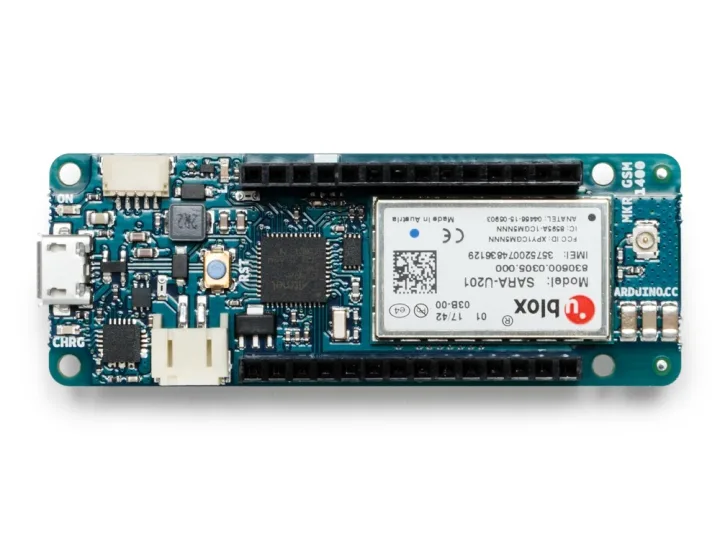
Example ArduinoGSM1400:
#define THINGER_SERIAL_DEBUG

#include <ThingerMKRGSM.h>
#include "arduino_secrets.h"

ThingerMKRGSM thing(USERNAME, DEVICE_ID, DEVICE_CREDENTIAL);

void setup() {
  // open serial for debugging
  Serial.begin(115200);

  // PIN of the SIM card (remove it if the SIM has no PIN)
  thing.set_pin(PIN_NUMBER);

  // APN of the operator
  thing.set_apn(GPRS_APN, GPRS_LOGIN, GPRS_PASSWORD);

  // set builtin led to output
  pinMode(LED_BUILTIN, OUTPUT);

  // pin control example over internet (i.e. turning on/off a light, a relay, etc)
  thing["led"] << digitalPin(LED_BUILTIN);

  // resource output example (i.e. reading a sensor value, a variable, etc)
  thing["millis"] >> outputValue(millis());
}

void loop() {
  thing.handle();
}
set_apn(apn, user, password)is required: without it, the board does not connect. The user and password default to empty.set_pin()is only needed if the SIM card has a PIN.thing.getGSM()andthing.getGPRS()give the modem objects of the MKRGSM library, for example to read the signal or the IP address.
MKR NB 1500
The MKR NB 1500 has a SAMD21 microcontroller, a u-blox SARA-R410M-02B modem for LTE Cat M1 and NB-IoT (bands 1, 2, 3, 4, 5, 8, 12, 13, 18, 19, 20, 25, 26 and 28) and a crypto chip. Check that your operator and your SIM support LTE Cat M1 or NB-IoT where the board runs.
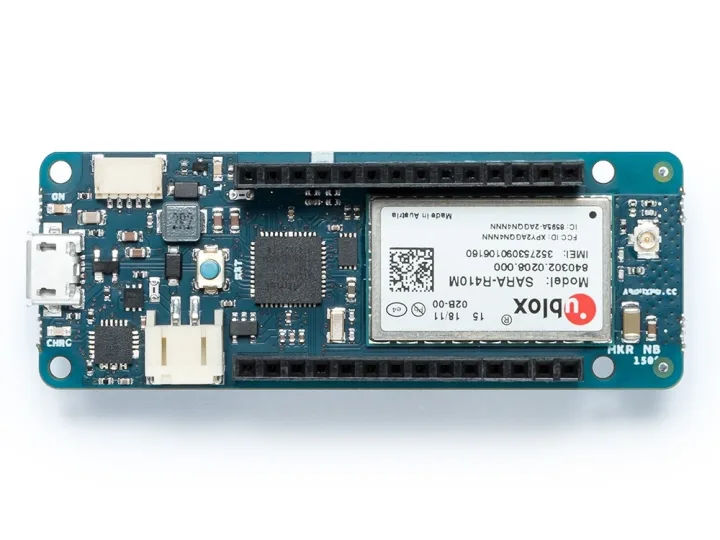
Example ArduinoMKRNB1500, with OTA updates and an output resource with the time of the cellular network:
#define THINGER_SERIAL_DEBUG

#include <ThingerMKRNB.h>
#include <ThingerMKRNBOTA.h>
#include "arduino_secrets.h"

ThingerMKRNB thing(USERNAME, DEVICE_ID, DEVICE_CREDENTIAL);

// press the reset button after an OTA update to start the new firmware
ThingerMKRNBOTA ota(thing);

void setup() {
  // enable serial for debugging
  Serial.begin(115200);

  // PIN of the SIM card (remove it if the SIM has no PIN)
  thing.set_pin(PIN_NUMBER);

  // APN of the operator
  thing.set_apn(GPRS_APN, GPRS_LOGIN, GPRS_PASSWORD);

  // set builtin led to output
  pinMode(LED_BUILTIN, OUTPUT);

  // pin control example over internet (i.e. turning on/off a light, a relay, etc)
  thing["led"] << digitalPin(LED_BUILTIN);

  // time of the cellular network, in seconds since 1970 (Unix time)
  thing["time"] >> [&](pson& out){
    out = thing.getNB().getTime();
  };
}

void loop() {
  thing.handle();
}- The board waits up to 2 minutes for the network on each attempt. If it cannot reach the server six times in a row, it restarts the modem; after twelve, it does a hard reset of the modem.
- After an OTA update, press the reset button of the board to start the new firmware.
- OTA updates over NB-IoT are slow: the firmware travels in small blocks over a slow network.
thing.getNB()andthing.getGPRS()give the modem objects of the MKRNB library.
Arduino with a GSM modem
Based on the example ArduinoTinyGSM. An Arduino with a free hardware serial port can use a GSM modem through the TinyGSM library: SIM800, SIM900, A6, A7, M590 and the other modems TinyGSM supports. Define the model of your modem before the includes.
Use a board with a 32-bit microcontroller, such as an Arduino MKR or Zero board: on AVR boards (UNO, Mega) ThingerTinyGSM does not compile. The sketch talks to the modem over Serial1. On an ESP32, #define THINGER_FREE_RTOS before the includes adds thing.start(), which runs the connection in its own task, as in ESP32 with the connection in its own task.
This sketch has its own credentials file, with the names the example uses:
#define THINGER_SERIAL_DEBUG

// select your modem
#define TINY_GSM_MODEM_SIM800
// #define TINY_GSM_MODEM_SIM900
// #define TINY_GSM_MODEM_A6
// #define TINY_GSM_MODEM_A7
// #define TINY_GSM_MODEM_M590

// requires the TinyGSM library
#include <TinyGsmClient.h>
#include <ThingerTinyGSM.h>
#include "arduino_secrets.h"

// Serial1: hardware serial port wired to the modem
ThingerTinyGSM thing(USERNAME, DEVICE_ID, DEVICE_CREDENTIAL, Serial1);

void setup() {
  // open serial for debugging
  Serial.begin(115200);

  // serial port of the modem, at its baud rate
  Serial1.begin(57600);

  // APN of the operator (remove the user and password if your APN has none)
  thing.setAPN(APN_NAME, APN_USER, APN_PSWD);

  // PIN of the SIM card (optional)
  // thing.setPIN(CARD_PIN);

  // resource input example (i.e, controlling a digitalPin);
  pinMode(LED_BUILTIN, OUTPUT);
  thing["led"] << digitalPin(LED_BUILTIN);

  // resource output example (i.e. reading a sensor value)
  thing["millis"] >> outputValue(millis());
}

void loop() {
  thing.handle();
}#define USERNAME "YOUR_USER"
#define DEVICE_ID "YOUR_DEVICE"
#define DEVICE_CREDENTIAL "YOUR_TOKEN"
// APN of your operator
#define APN_NAME "internet.example"
#define APN_USER ""
#define APN_PSWD ""
// PIN of the SIM card (optional)
#define CARD_PIN "1234"- The fourth argument of the class is the serial port wired to the modem.
ThingerTinyGSMnames its methodssetAPN()andsetPIN(), notset_apn()andset_pin().setAPN()is required.- When the modem is not on the network, the class restarts it, unlocks the SIM if it has a PIN and waits up to 15 seconds for the network.
thing.setModuleReset(function)runs your function before each connection attempt, for example to power-cycle the modem with a pin. thing.getTinyGsm()gives the TinyGSM modem, for example to read the signal quality.- The connection uses TLS when the modem supports it in TinyGSM. On modems without TLS, define
_DISABLE_TLS_before the includes to connect to the server port without TLS.
See also
- Supported boards: every board, its class and its OTA support.
- OTA updates: send new firmware over the Internet.
- Thinger.io hardware: NB-IoT boards made by Thinger.io.