

A sync is a shared semaphore: it has a number of slots, and devices or API clients take some of them with a lock before they start a task and release them when they finish. When all the slots are taken, new locks fail until one is released or expires.
When to use it
- To let only a few devices download a firmware update at the same time, so they do not saturate the network or the server.
- To make sure that only one controller drives a shared actuator, such as a pump or a gate.
- To keep two API clients or backend jobs from working on the same task at once.
Create a sync
YOUR_SERVER is iot.thinger.io on the free Cloud account, or the domain of your private instance.
Console
Open Syncs
Go to Toolbox > Syncs and click Add Sync.
Fill in the form
Set the Sync Identifier, the Name and an optional Description. In Configuration, leave Enabled on, set Slots Available to the number of locks that can be held at the same time, and set the Default Timeout in seconds (
0keeps each lock until it is released).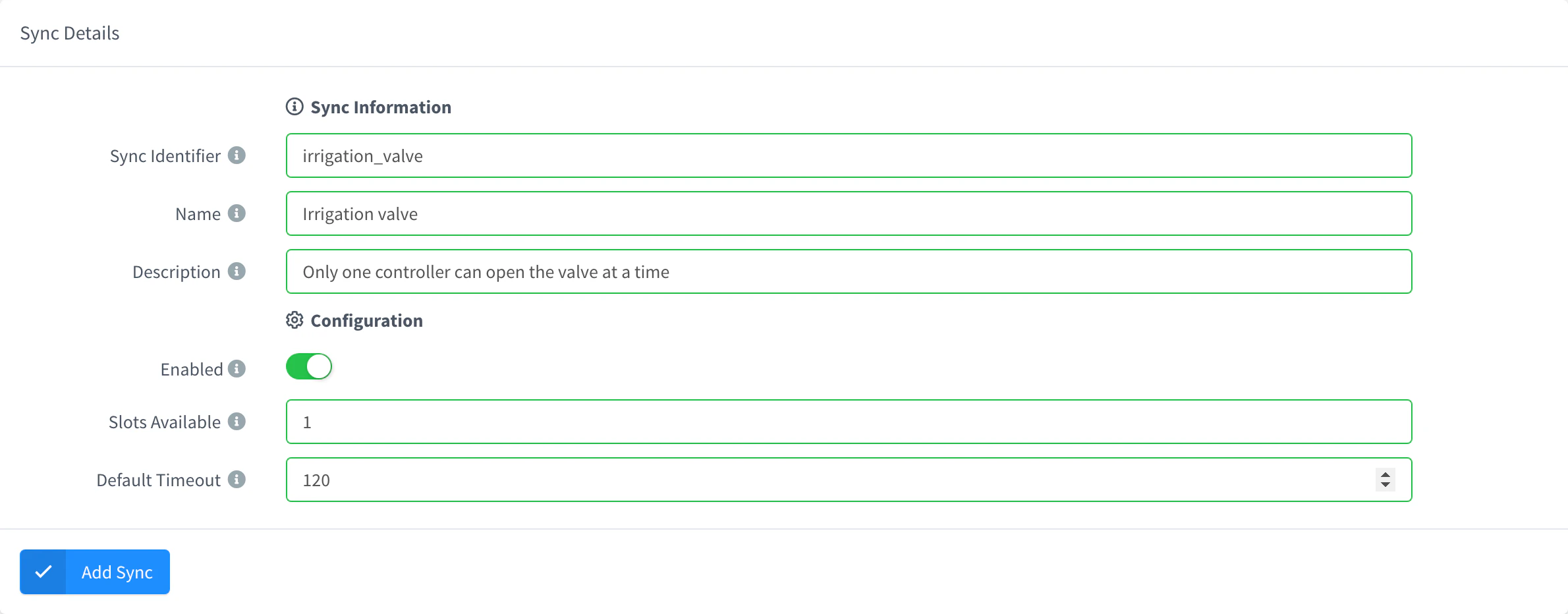
Add a sync Save it
Click Add Sync. The sync opens on its Settings tab.
API
curl -X POST "https://YOUR_SERVER/v1/users/YOUR_USER/syncs" \
  -H "Authorization: Bearer YOUR_TOKEN" \
  -H "Content-Type: application/json" \
  -d '{"sync": "dosing_pump", "name": "Dosing pump", "enabled": true, "config": {"available": 1, "timeout": 120}}'
config.available is the number of slots and config.timeout the default lifetime of a lock, in seconds. YOUR_TOKEN is an access token with permission to create syncs.
CLI
The CLI has no commands for syncs. Use the console, the API or an agent.
AI
Create a sync called dosing_pump with one slot and a default timeout of two minutes, so only one controller can dose at a time.
The agent uses thinger_resource_create with the sync type. See MCP tools.
Take and release a lock
A lock takes one slot by default, or the number you set in slots. It lasts the default timeout of the sync unless you set another timeout, and it gets a random ID if you do not give one. Delete the lock to release its slots.
Console
The console does not take locks. Open the sync on its Locks tab to see the locks currently held, with their Slots, Created and Expire dates, and delete a lock to free its slots.

API
curl -X POST "https://YOUR_SERVER/v1/users/YOUR_USER/syncs/dosing_pump/locks" \
  -H "Authorization: Bearer YOUR_TOKEN" \
  -H "Content-Type: application/json" \
  -d '{"lock": "controller_1", "name": "Controller 1"}'
The answer includes the expire date of the lock, in milliseconds. When the slots are not enough, the call fails with insufficient slots available.
curl -X DELETE "https://YOUR_SERVER/v1/users/YOUR_USER/syncs/dosing_pump/locks/controller_1" \
  -H "Authorization: Bearer YOUR_TOKEN"
CLI
The CLI has no commands for syncs. Use the API, an agent or a device.
AI
Take a lock called controller_1 on the dosing_pump sync, and release it when I tell you the dosing has finished.
The agent uses thinger_resource_create and thinger_resource_delete with the sync_lock type and the sync as parent.
IOTMP devices can take and release locks themselves: the Linux client of the IOTMP library has lock_sync and unlock_sync, which return whether the call succeeded.
Limits
- A lock fails when the sync is disabled (
requested sync is disabled), when its slots are not enough (insufficient slots available) or when a lock with the same ID is already held (slot already reserved). - A sync with Slots Available set to
0refuses every lock. - Locks cannot be renewed or extended: only their
nameanddescriptioncan change. To hold a slot longer, release the lock and take it again, or set a longertimeout. - An expired lock is removed shortly after its
expiredate, not at the exact second. - Deleting a sync deletes its locks.
- The number of syncs depends on your plan: see Plans and limits.