

In this tutorial you define a product for a fleet of identical sensors and let each unit create its own device the first time it connects, already inside the product, with its properties, its Data Bucket and its dashboard. You flash the same firmware on every unit; only the device ID and the credentials change. It takes about 30 minutes.
What you need
- A Thinger.io account. On the free Cloud account your server is
iot.thinger.io; on a private instance, use your own domain wherever this tutorial saysYOUR_SERVER. - Two or more ESP32 boards (or any board supported by the Thinger.io Arduino library).
- For the API tabs, an access token (
YOUR_TOKEN) that can create products. For the CLI tabs, thethingerCLI signed in to your account.
To compare Auto Provision with adding devices by hand or with claims, read Provisioning at scale first.
Create the product
The product env_sensor has three parts in its profile: a settings property with a default value, a climate bucket that reads the climate resource of each device every minute, and an Auto Provision rule that accepts any device ID made of sensor_ and 12 hexadecimal digits. Products describes every part of a profile.
Console
Add the product
Go to Products and click Create a new Product. Set the Product ID to
env_sensorand a Product Name, and click Add Product. The product opens on its Profile tab.Add the property
In the Properties card, click Add, set the identifier
settingsand, on Default Value, type{"threshold": 30}. Save it. See Product properties.Add the bucket
In the Buckets card, click Add, set the identifier
climateand read the device resourceclimateevery 60 seconds. Save it. See Product buckets.Add the Auto Provision rule
In the Auto Provision card, click Add and set the Provision Identifier to
units. Leave the Provisioning Mode in Device Pattern and type^sensor_[0-9a-f]{12}$in Device Pattern. On Settings, set the Name that new devices get, leave Enabled on and click Save. See Auto Provision.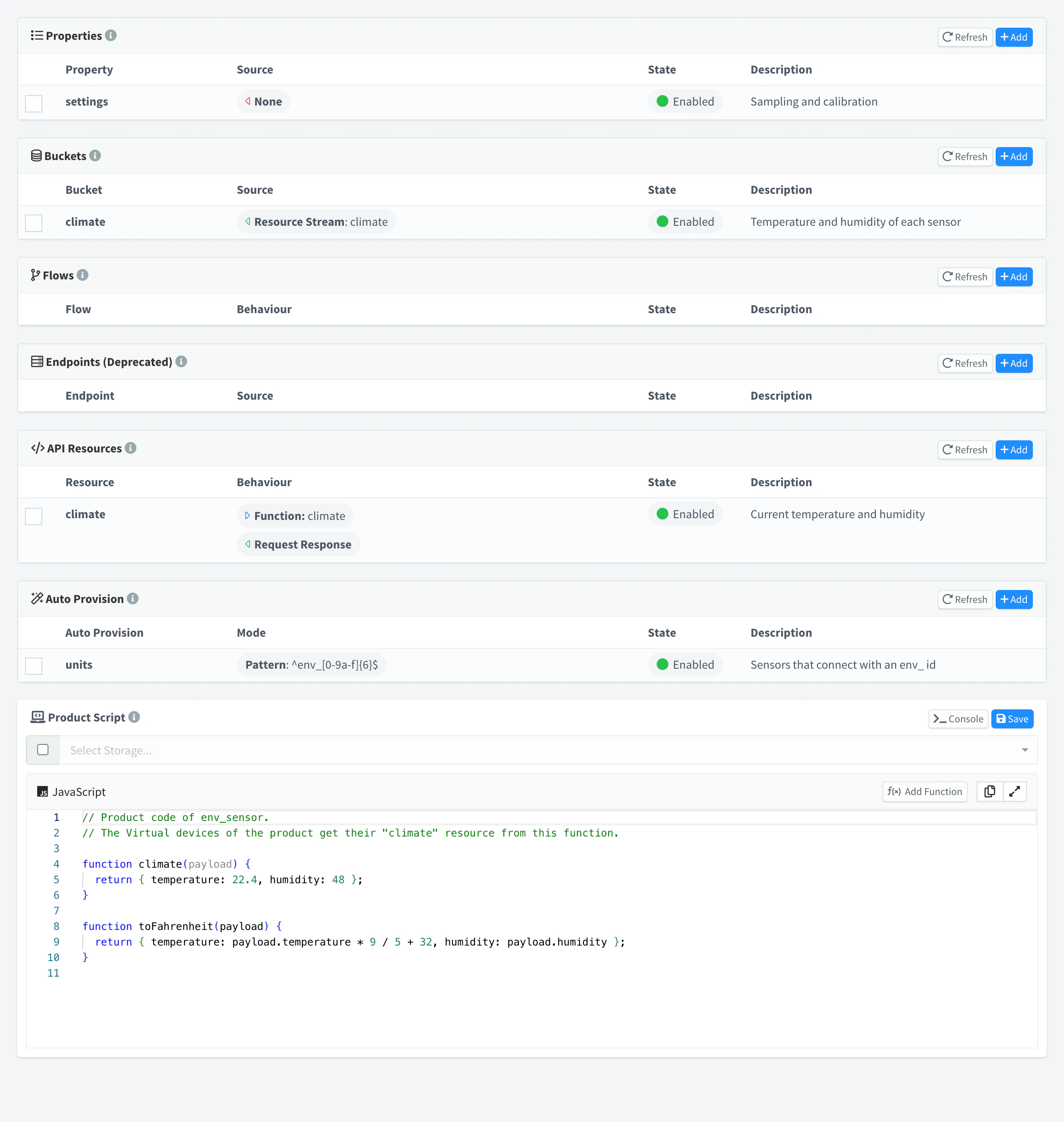
Profile of the env_sensor product
API
Create the product, then save each profile entry:
curl -X POST "https://YOUR_SERVER/v1/users/YOUR_USER/products" \
  -H "Authorization: Bearer YOUR_TOKEN" \
  -H "Content-Type: application/json" \
-d '{"product": "env_sensor", "name": "Environment sensor", "enabled": true}'curl -X PUT "https://YOUR_SERVER/v1/users/YOUR_USER/products/env_sensor/profile/properties/settings" \
-H "Authorization: Bearer YOUR_TOKEN" \
-H "Content-Type: application/json" \
-d '{"name": "Settings", "enabled": true, "default": {"value": {"threshold": 30}}}'
curl -X PUT "https://YOUR_SERVER/v1/users/YOUR_USER/products/env_sensor/profile/buckets/climate" \
-H "Authorization: Bearer YOUR_TOKEN" \
-H "Content-Type: application/json" \
-d '{"name": "Climate", "enabled": true, "data": {"source": "resource", "resource": "climate",
"update": "interval", "interval": 60, "magnitude": "second", "payload_type": "source_payload"}}'
curl -X PUT "https://YOUR_SERVER/v1/users/YOUR_USER/products/env_sensor/profile/autoprovisions/units" \
-H "Authorization: Bearer YOUR_TOKEN" \
-H "Content-Type: application/json" \
-d '{"name": "Environment sensor", "enabled": true,
"config": {"mode": "pattern", "pattern": "^sensor_[0-9a-f]{12}$"}}'CLI
The CLI cannot edit profile entries one by one, but it creates the product with its whole profile from a JSON document:
{
  "profile": {
    "properties": {
      "settings": { "name": "Settings", "enabled": true, "default": { "value": { "threshold": 30 } } }
    },
    "buckets": {
      "climate": {
        "name": "Climate",
        "enabled": true,
        "data": { "source": "resource", "resource": "climate", "update": "interval",
                  "interval": 60, "magnitude": "second", "payload_type": "source_payload" }
      }
    },
    "autoprovisions": {
      "units": {
        "name": "Environment sensor",
        "enabled": true,
        "config": { "mode": "pattern", "pattern": "^sensor_[0-9a-f]{12}$" }
      }
    }
  }
}thinger product create env_sensor -n "Environment sensor" --from env_sensor.jsonA product created with its whole profile does not create the product property of the default value yet. Save the settings entry once more, from the console or with the PUT of the API tab, so that devices inherit it.
AI
Create a product called env_sensor with a settings property whose default value is {"threshold": 30}, a climate bucket that reads the climate resource of each device every 60 seconds, and an Auto Provision rule that creates any device whose ID is sensor_ followed by 12 hexadecimal digits.
The agent uses thinger_resource_create with the product type and the profile entry types. See MCP tools.
Add the product dashboard
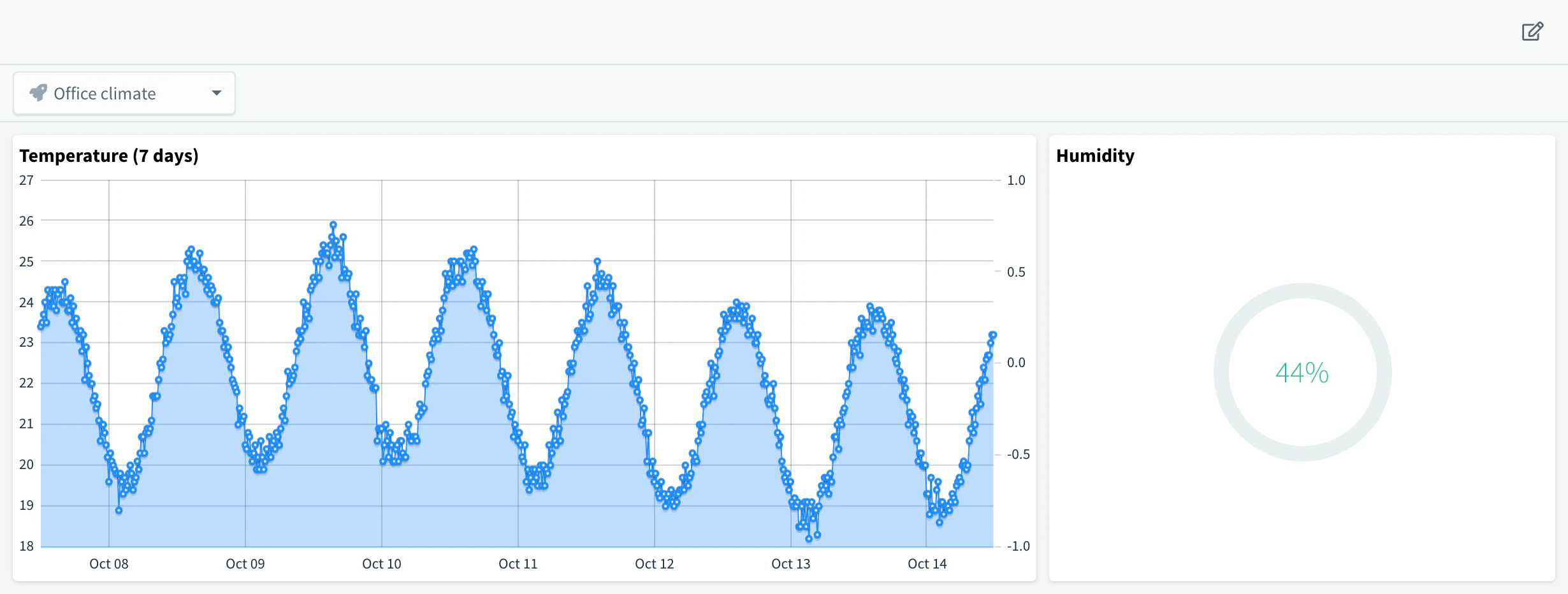
A product dashboard is shown in the Dashboard tab of every device of the product, each with its own data. Open the product, go to Dashboard, choose one of its devices for the preview once you have one, and add a Time Series Chart with From Device Bucket as the source, bucket climate, field temperature. See Product dashboard.
To use a web app as the product dashboard instead, publish it with thinger dashboard publish --to product:env_sensor: see Build a dashboard app.
Flash the firmware
Every unit runs the same sketch. The device ID comes from the MAC address of the board, so it matches the pattern of the rule, and each unit presents its own device credentials. The first connection creates the device with those credentials.
#define THINGER_SERIAL_DEBUG

#include <ThingerESP32.h>

#define USERNAME "YOUR_USER"
#define WIFI_SSID "wifi-network"
#define WIFI_PASSWORD "wifi-password"

ThingerESP32* thing = nullptr;
String deviceId;
String credentials;

void setup() {
  Serial.begin(115200);

  // device ID: sensor_ + the 12 hex digits of the MAC address
  uint64_t mac = ESP.getEfuseMac();
  char hex[13];
  snprintf(hex, sizeof(hex), "%012llx", mac);
  deviceId = String("sensor_") + hex;

  // replace with the per-unit credentials you store in production
  credentials = String("YOUR_TOKEN-") + hex;

  thing = new ThingerESP32(USERNAME, deviceId.c_str(), credentials.c_str());
  thing->add_wifi(WIFI_SSID, WIFI_PASSWORD);

  // output resource read by the climate bucket of the product
  (*thing)["climate"] >> [](pson& out) {
    out["temperature"] = temperatureRead();
  };

  Serial.println(deviceId);
}

void loop() {
  thing->handle();
}
YOUR_TOKEN here is a prefix of your own for the device credentials. In production, store unique credentials on each unit when you manufacture it, rather than deriving them from the MAC address, which anyone near the device can read.
Warning
Keep the pattern narrow and anchored with ^ and $: any device that connects with a matching ID creates a device in your account. Disable the rule when the fleet is deployed if you do not expect new units.
Switch the units on
Power two units. Within seconds both appear in Devices, connected, with the product env_sensor and the name set in the rule.
Console
Go to Devices: the new devices show the product env_sensor. Open one and go to Properties: it has settings with {"threshold": 30}, inherited from the product. After a minute, its Dashboard tab shows its own temperature.
API
curl "https://YOUR_SERVER/v1/users/YOUR_USER/devices" \
  -H "Authorization: Bearer YOUR_TOKEN"
CLI
thinger device list sensor_
thinger device property YOUR_DEVICE
thinger bucket read climate --items 6
thinger device property lists settings (and dashboard, if the product has one). The bucket records carry a device field with the ID of each unit.
AI
List the devices of the product env_sensor with their connection status, and show the last temperature of each one from the climate bucket.
The product bucket appears in Data Buckets when the first device writes to it, and it keeps its data if you later delete the product.
Result
Each unit you switch on registers itself: it appears in Devices inside the product env_sensor, inherits the settings property, writes its temperature to the shared climate bucket tagged with its device ID, and shows it in its own Dashboard tab. You never created a device by hand.
Next steps
- Update the firmware of the whole fleet with OTA updates.
- Hand devices over to your customers with claims.
- Group the units by site with Assets, and alert on them with Alarms.